Pictures speak louder than words. They can convey feelings, ideas, and even actions in a way that text cannot. But when used well, they can also be powerful tools for communication.
Know Your Audience.
If you’re going to use pictures in your communications, you need to understand who you’re communicating with. What do they care about? How can you help them? What will motivate them to take action? These questions should guide your selection of images.
Choose the Right Picture.
It’s not enough to just choose an image; you also need to make sure it’s the right one. There are several things to consider when choosing an image, such as whether it’s appropriate for the message you’re trying to convey, whether it matches the tone of your communication and whether it helps you achieve your goals.
Create an Image Strategy.
A picture is worth a thousand words, but only if you know how to use them. To help you do so, here are some tips to keep in mind when creating an effective image strategy.
Add Visual Elements to Your Blog Post.
Images are powerful tools that can add visual interest to your blog posts. They can also make your text more memorable by helping readers recall key points.
Include Images in Social Media Posts.
There’s no doubt that images speak louder than words when it comes to social media. If you’re posting something online, chances are there will be an image associated with it. This means that you should take advantage of the opportunity to use images to help tell your story.
Note: If you want to make some adjustments to the photo just let me know. I can do it for you at a very low cost. You can hire me to edit your photo
In 2026, customer expectations are higher than ever. Small businesses are no longer competing only with local players—they are competing with digital-first brands that deliver personalized, fast, and seamless experiences. This is where CRM for small business becomes not just helpful, but essential. Customer Relationship Management (CRM) software helps small businesses manage leads, customers, sales,… Read more: Why Every Small Business Needs a CRM
In today’s hyper-connected digital world, access to information is often dependent on internet availability. However, millions of users still struggle with poor connectivity, high data costs, and limited access to digital services. This is where D2M technology comes into play. Direct-to-Mobile (D2M) technology is a revolutionary broadcasting method that delivers multimedia content directly to mobile… Read more: D2M Technology: The Future of Direct-to-Mobile Content Delivery
Website Design for Educational Institutions: A Complete Guide for Modern Learning Platforms In today’s digital-first world, website design for educational institutions plays a critical role in shaping perceptions, driving admissions, and enhancing learning experiences. Schools, colleges, universities, training centers, and academies are no longer judged solely by their campus or curriculum—their website is often the… Read more: Website Design for Educational Institutions
1. Introduction: The Intersection of AI and Hair Care The global hair loss treatment market is projected to reach billions of dollars by 2030. For decades, the process of diagnosing hair loss was subjective, relying on the “naked eye” of a general practitioner or the expensive consultation of a specialist. Enter HairLens AI, a disruptive… Read more: The Comprehensive Guide to HairLens AI: Revolutionizing Trichology through Artificial Intelligence
Technology keeps evolving at lightning speed, and so does the way we work, create, learn, and entertain ourselves online. As subscriptions and software costs continue to rise, more people are actively searching for the best 5 free tools for 2026 that deliver powerful features without draining their budget. Whether you’re a content creator, student, professional,… Read more: The Best 5 Free Tools for 2026 — A Complete Guide to the Best 5 Free Tools for 2026
If you’re new to Google Maps, here’s what you need to do to start finding your current location. First, open up Google Maps by clicking the search bar at the top of the screen. Then, click the blue arrow next to the search bar to bring up the menu. Next, select “Locate Me.” Finally, type in your address or zip code into the box that appears.
Enter your address into Google Maps.
Once you’ve entered your address, Google will show you a map with your location highlighted. Click on the pin icon to see more details about your location.
Click on the map icon at the top left corner of the page.
If you’re looking for directions, click on the “Directions” tab. This will take you to a map showing your route.
Scroll down until you see “Your current location” or “Where am I?”
Click on the arrow next to “Your current location.” A pop-up box will appear with your current location.
Click on the arrow next to “Your current location.”
If you’re looking for directions, click on the arrow next to “Directions.” This will take you to a map showing how to get there.
Note: If you need cloud storage, please visit RainX Drive
In 2026, customer expectations are higher than ever. Small businesses are no longer competing only with local players—they are competing with digital-first brands that deliver personalized, fast, and seamless experiences. This is where CRM for small business becomes not just helpful, but essential. Customer Relationship Management (CRM) software helps small businesses manage leads, customers, sales,…
In today’s hyper-connected digital world, access to information is often dependent on internet availability. However, millions of users still struggle with poor connectivity, high data costs, and limited access to digital services. This is where D2M technology comes into play. Direct-to-Mobile (D2M) technology is a revolutionary broadcasting method that delivers multimedia content directly to mobile…
Website Design for Educational Institutions: A Complete Guide for Modern Learning Platforms In today’s digital-first world, website design for educational institutions plays a critical role in shaping perceptions, driving admissions, and enhancing learning experiences. Schools, colleges, universities, training centers, and academies are no longer judged solely by their campus or curriculum—their website is often the…
Real estate marketing in the modern world has moved almost entirely online and virtual staging is leading the way. In fact, recent research from ZillowGroup found that more than 36% of Americans are more likely to try to buy a home entirely online during the coronavirus pandemic, and 30% will do so even after the outbreak.
discovered today. When it comes to real estate marketing, nothing is more important than the quality of your listing photos. Virtual staging will help real estate photographers improve their photography and become invaluable to agents. This relatively new technology will help them sell their home faster and for the best price. In this article, we will discuss what virtual staging is, how it compares to traditional staging, and how to quickly sell this amazing marketing tool to your real estate agents.
What Is Virtual Staging?
Virtual staging is a special computer-assisted design (CAD) process wherein virtually designed furniture is added to a photo of an empty room or space, much like traditional home staging.
As they say, a picture is worth a thousand words… Virtual staging allows real estate agents to present a listing in its best light and enhance it with photographs. Virtually staged ensures that buyers will take note. Even better, it can turn an empty space into an attractive home that potential buyers can imagine themselves living in. With the help of professional virtual set designers, staff can clean up cluttered and outdated rooms or add elegant furniture and decor to empty spaces to make them feel attractive, livable, and marketable.
Traditional Home Staging vs Virtual Staging
Any agent will tell you that selling an empty home is harder than selling a beautifully furnished one. There is no denying that home buying and selling plays a very important role in helping to sell your home faster and get the best price. However, traditional home staging is becoming more and more expensive. According to Orchard, a full-service staging — which requires renting furniture and overhauling a home — can cost as much as $10,000.
But here’s the good news… Virtual Staging can reduce staging costs by up to 97%! This form of home digital staging saves a lot of money compared to traditional staging. In addition, the physical decoration of space also takes more time than its virtual decoration. Each property will require a different design composition of furniture and decor due to the different layout and style of each home. Agents should research professional home organization companies in the area, ask for a quote, wait for them to deliver furniture and decor, and prepare to market the home.
Typically, traditional home construction takes 7-14 days to plan and set up, which is a time you don’t typically get in a highly competitive real estate market. On the other hand, virtual staging is done by designers who specialize in taking pictures of empty or outdated houses and transforming them into beautiful, fully furnished rooms using furniture and decor in the style of photorealistic way. Did we mention the virtual rig’s turnaround time is only 24-48 hours? This will save the agent a lot of time, effort and money!
Selling Arguments for Virtual Staging
If you’re looking to sell virtual staging to your clients, here are 4 selling points that will help real estate agents see the value of using staged virtual listing photos.
Powerful Marketing Tool
97% of potential home buyers start their property search online, and 85% of buyers agree that listing images are the most important factor when viewing a home online. This means that capturing compelling real estate photos is one of the most powerful marketing tools real estate agents have to work with.
Poor-quality property photography can be distracting and hinder sales. Not only is it difficult for buyers to look at a cluttered room and try to imagine themselves living there, but it can also ruin a potential buyer’s first impression and lead them to reject the property. On the other hand, using virtual staging to enhance real estate photography will help agents present attractive photos and sell homes faster and make more money.
Increases the Value of a Home
Virtual home staging is essential as it allows any real estate agent to increase the value of a home and speed up sales. As mentioned, it’s hard to convince buyers to buy a home if they don’t see its potential of the home. In addition, virtual staging allows agents to highlight special features of different parts of the property.
It can create an eye-catching home and can dramatically improve its overall value. By organizing virtually one home, real estate agents can cater to all markets and provide potential buyers with a taste of what life can be like in their new home. surname. Additionally, the agent will benefit financially from the sale because homes with high-quality photos typically receive a 47% higher asking price per square foot.
Saves Time, Effort, and Money
Brokers can save a lot of time, effort, and money by using virtual staging. For example, think of the extra time and effort it takes to find and hire a professional staging company, followed by the extra time it takes to deliver the furniture and set things up, and take photos. Not to mention the cost of hiring an actual staging company and a real estate photographer (as we mentioned earlier).
Unlike traditional home staging, virtual staging allows you to take pictures of empty rooms a day and send the staging photos to you within 24 to 48 hours. More importantly, if an agent is about to sell an empty or messy home and time is against them, going the virtual route will provide a competitive edge over other traditional sellers.
Target Specific Markets
Another advantage of virtual staging is that real estate agents can customize the space based on the style and preferences of the home or buyer demographics. From Mid Century Modern to Hamptons Beach House – Virtual Staging Editor can wave a magic wand and tweak the look of a room. Accordingly, if the agency works with wealthy individuals, the designer can fill the space with luxurious furniture and decor to help convey a sense of luxury.
Depending on the buyer’s tastes and the type of home he is looking for, he can get an idea of the potential of the home and whether he finds himself living in it. In other words, virtual staging helps real estate agents deliver exactly what their clients are looking for.
Conclusion
It’s safe to say that virtual staging is one of the most powerful marketing tools in today’s internet age. Potential buyers can safely browse through thousands of listing photos from the comfort of their homes and don’t even need to take a physical visit to purchase a property. Not only is virtual staging more cost-effective than traditional staging, but it can also help agencies sell ads faster and make more money. Try using some of the stats included in this article to help you deliver a virtual system to your customers on their next check-in!
Note: If you want to make some adjustments to the photo just let me know. I can do it for you at a very low cost. You can hire me to edit your photo
In 2026, customer expectations are higher than ever. Small businesses are no longer competing only with local players—they are competing with digital-first brands that deliver personalized, fast, and seamless experiences. This is where CRM for small business becomes not just helpful, but essential. Customer Relationship Management (CRM) software helps small businesses manage leads, customers, sales,… Read more: Why Every Small Business Needs a CRM
In today’s hyper-connected digital world, access to information is often dependent on internet availability. However, millions of users still struggle with poor connectivity, high data costs, and limited access to digital services. This is where D2M technology comes into play. Direct-to-Mobile (D2M) technology is a revolutionary broadcasting method that delivers multimedia content directly to mobile… Read more: D2M Technology: The Future of Direct-to-Mobile Content Delivery
Website Design for Educational Institutions: A Complete Guide for Modern Learning Platforms In today’s digital-first world, website design for educational institutions plays a critical role in shaping perceptions, driving admissions, and enhancing learning experiences. Schools, colleges, universities, training centers, and academies are no longer judged solely by their campus or curriculum—their website is often the… Read more: Website Design for Educational Institutions
1. Introduction: The Intersection of AI and Hair Care The global hair loss treatment market is projected to reach billions of dollars by 2030. For decades, the process of diagnosing hair loss was subjective, relying on the “naked eye” of a general practitioner or the expensive consultation of a specialist. Enter HairLens AI, a disruptive… Read more: The Comprehensive Guide to HairLens AI: Revolutionizing Trichology through Artificial Intelligence
Technology keeps evolving at lightning speed, and so does the way we work, create, learn, and entertain ourselves online. As subscriptions and software costs continue to rise, more people are actively searching for the best 5 free tools for 2026 that deliver powerful features without draining their budget. Whether you’re a content creator, student, professional,… Read more: The Best 5 Free Tools for 2026 — A Complete Guide to the Best 5 Free Tools for 2026
All Windows machines need one of the best antivirus programs to stay protected from malware and other cyber threats. While Microsoft Defender Antivirus may be enough to protect your PC from infection, it simply cannot match the extra features available with paid antivirus software. Most high-end security suites and even some mid-range security suites include VPNs, password managers, parental controls, or identity theft protection – all cheaper if you buy one for each feature alone.
Each of the Windows antivirus programs on this list has its own malware detection engine, but it’s the new features that come with different price points. An antivirus company can offer a free program, a basic paid program, a mid-range program with more features, and finally a premium product complete with all both bells and whistles. However, you can also get Mac antivirus, Android antivirus, and iOS security apps along with them.
What is the best antivirus software?
Our top pick for the best antivirus is Norton 360 with LifeLock Select because it offers great malware protection and lots of extras, including unlimited VPN and LifeLock identity protection. However, all of this comes at a cost – $99/year for the first year ($150 on renewal). At just $20/year for the first year ($40 on renewal), the entry-level Bitdefender Antivirus Plus plan is the best deal in antivirus software. It offers a ton of features, including a password manager, secure browser, Wi-Fi network scanner, file shredder, and ransomware protection, for a price a lot less than Norton. If you want to save even more, Windows Defender is the best free antivirus available today. While not as effective as Norton, it still beats some paid programs when it comes to detecting malware. It doesn’t have a lot of extras, but you do get parental controls, game modes, and protections for Microsoft’s Edge browser.
Any of these three will serve you well, but the ideal choice depends on your situation. Check out our section on choosing the best antivirus below or our standalone antivirus buying guide. Our free leaderboard instantly follows our paid leaderboard below. Editor’s note: Future, the parent company of Tom’s Guide, has decided to no longer do business with Russian companies, including Kaspersky. We remain committed to helping our readers source and find the best products and will provide a variety of alternatives in relevant categories.
In 2026, customer expectations are higher than ever. Small businesses are no longer competing only with local players—they are competing with digital-first brands that deliver personalized, fast, and seamless experiences. This is where CRM for small business becomes not just helpful, but essential. Customer Relationship Management (CRM) software helps small businesses manage leads, customers, sales,… Read more: Why Every Small Business Needs a CRM
In today’s hyper-connected digital world, access to information is often dependent on internet availability. However, millions of users still struggle with poor connectivity, high data costs, and limited access to digital services. This is where D2M technology comes into play. Direct-to-Mobile (D2M) technology is a revolutionary broadcasting method that delivers multimedia content directly to mobile… Read more: D2M Technology: The Future of Direct-to-Mobile Content Delivery
Website Design for Educational Institutions: A Complete Guide for Modern Learning Platforms In today’s digital-first world, website design for educational institutions plays a critical role in shaping perceptions, driving admissions, and enhancing learning experiences. Schools, colleges, universities, training centers, and academies are no longer judged solely by their campus or curriculum—their website is often the… Read more: Website Design for Educational Institutions
1. Introduction: The Intersection of AI and Hair Care The global hair loss treatment market is projected to reach billions of dollars by 2030. For decades, the process of diagnosing hair loss was subjective, relying on the “naked eye” of a general practitioner or the expensive consultation of a specialist. Enter HairLens AI, a disruptive… Read more: The Comprehensive Guide to HairLens AI: Revolutionizing Trichology through Artificial Intelligence
Technology keeps evolving at lightning speed, and so does the way we work, create, learn, and entertain ourselves online. As subscriptions and software costs continue to rise, more people are actively searching for the best 5 free tools for 2026 that deliver powerful features without draining their budget. Whether you’re a content creator, student, professional,… Read more: The Best 5 Free Tools for 2026 — A Complete Guide to the Best 5 Free Tools for 2026
Download Adobe Animate for FREE (formerly Adobe Flash Professional, Macromedia Flash, and FutureSplash Animator) and create multimedia and animation without registration. Animate was designed by Adobe Systems as a cross-functional platform for creating graphic design projects, animation, advertising, web applications, games, online videos, interactive vector animations, and other content. interactive content.
Can I download and install the Adobe Animate trial?
Any registered Adobe user can get a trial version of any Creative Cloud application. Animation is no exception. Simply enter your Adobe ID, and password, and download a free trial from the Creative Cloud portfolio of apps.
How can I download and install Adobe Animate?
First, navigate to the Creative Cloud apps category. Sign in, and enter your Adobe ID and password. Find Adobe Animate and download the program to your computer. If you want to install previous versions or check for downloadable updates of Adobe Animate, see Download the Creative Cloud app catalog.
Is it possible to install Flash animation software on another computer?
Animate and other Adobe products can only be used on two computers. If you want to install the software on multiple PCs, you need to deactivate the program on one of your workstations.
How to apply layer depth to my Adobe animation?
Animate has an advanced layer feature that you can use to add layer depth to your timeline layers. It is possible to change the depth of a layer and animate it.
How to create animation without writing code?
If you are animating an HTML5 canvas, you can use the action code wizard. In this case, you don’t need to write any code. Learn how to use the Action Code Wizard in Animate.
How to install MXP and ZXP file extensions in Adobe animation software?
There are two options for installing MXP and ZXP file extensions: you can install them as add-ons using the Manage Extensions utility or with the help of the command line. Check how to install extensions in Animate and find tips that will help you fix any issues.
5 Reasons to Stop Using Pirated Flash Animation Software
There is no legal way to download Adobe Animate for free. That’s why many users are looking for pirated versions. Some of them do not realize the dangers of using this type of software. Therefore, you should be aware of the possible consequences and potential dangers of downloading pirated programs.
It is Illegal
Everyone knows it’s illegal, but not every user realizes the possible consequences. If you are a US or UK citizen, you may find the police on your doorstep or your case may go to court. You cannot hide your internet activity and what you download from your ISP. Also, software developers are more likely to put flags in their programs, so they know if you’re using licensed software. Even a small hacked application that you download from the web can lead to big problems.
You Don’t Get any Support
Modern software requires more specialized online support. If you download Adobe Flash Animation for free and it doesn’t work properly, you can’t call customer support. Your software is not licensed and if you have any problems you cannot contact anyone. In addition, many programs require cooperation with their host in order to function properly every time you use them. Since you are using bogus software, you are not entitled to technical support.
Trial Versions Are Available
In general, you can try Adobe Animate for free before purchasing a license. 14-30 days is enough to use all its functions and understand whether the program is worth the money the company is asking for. If the software seems too expensive, no one will charge you. This kind of market pressure has led to a drop in software and application prices. If the show is really worth it, you will definitely buy it.
It Won’t Upgrade
Adobe Flash Animator requires upgrading to improve its performance. Each program we use often connects to the developer’s host server.
Note: If you want to make some adjustments to the photo just let me know. I can do it for you at a very low cost. You can hire me to edit your photo
In 2026, customer expectations are higher than ever. Small businesses are no longer competing only with local players—they are competing with digital-first brands that deliver personalized, fast, and seamless experiences. This is where CRM for small business becomes not just helpful, but essential. Customer Relationship Management (CRM) software helps small businesses manage leads, customers, sales,… Read more: Why Every Small Business Needs a CRM
In today’s hyper-connected digital world, access to information is often dependent on internet availability. However, millions of users still struggle with poor connectivity, high data costs, and limited access to digital services. This is where D2M technology comes into play. Direct-to-Mobile (D2M) technology is a revolutionary broadcasting method that delivers multimedia content directly to mobile… Read more: D2M Technology: The Future of Direct-to-Mobile Content Delivery
Website Design for Educational Institutions: A Complete Guide for Modern Learning Platforms In today’s digital-first world, website design for educational institutions plays a critical role in shaping perceptions, driving admissions, and enhancing learning experiences. Schools, colleges, universities, training centers, and academies are no longer judged solely by their campus or curriculum—their website is often the… Read more: Website Design for Educational Institutions
1. Introduction: The Intersection of AI and Hair Care The global hair loss treatment market is projected to reach billions of dollars by 2030. For decades, the process of diagnosing hair loss was subjective, relying on the “naked eye” of a general practitioner or the expensive consultation of a specialist. Enter HairLens AI, a disruptive… Read more: The Comprehensive Guide to HairLens AI: Revolutionizing Trichology through Artificial Intelligence
Technology keeps evolving at lightning speed, and so does the way we work, create, learn, and entertain ourselves online. As subscriptions and software costs continue to rise, more people are actively searching for the best 5 free tools for 2026 that deliver powerful features without draining their budget. Whether you’re a content creator, student, professional,… Read more: The Best 5 Free Tools for 2026 — A Complete Guide to the Best 5 Free Tools for 2026
Adobe Reader Portable seems like the perfect software for our daily work with PDF files and we need a reliable tool that can read and convert our documents. You can copy it to a USB drive and use it on any PC. Portable Adobe Reader is mistaken for the official version of the original product, which may not look like it at all.Why is this program not on Adobe’s official website? What are the main differences from Adobe Acrobat Reader DC version? Answers to these questions can be found below.
What Is Adobe Reader Portable?
Adobe Acrobat Reader Portable is nothing more than an illegal copy of the original software that can be downloaded from third party websites. Hackers modify the code and remove some tools to create a so-called “free” version. Most users would be happy to download software products for free. However, this method will not save you money and will make you invest more in dealing with virus attacks on your PC. After installing “freeware”, you should be prepared for malware attacks and missed deadlines if your system is hacked.
Adobe Reader Portable or License Version?
Third-party services offer pirated software far from portable licensed copies, as licensed versions can only be downloaded from official websites. Be aware that installing them may put your system at risk. If you’re still considering downloading Adobe Reader Portable, read Potential Vulnerabilities first.
Adobe Reader Portable Disadvantages
Disruptions and malfunctions
Pirated programs are notoriously unreliable, so be prepared for constant crashes after launching PDF Reader Portable. If your system is unresponsive, rebooting may not help much. Also, this software is not compatible with other Adobe programs.
Malware threats
The portable version may be infected with viruses. Some of them may not be recognized by your antivirus software, so be prepared to reinstall your system. I have.
No updates
If you buy a pirated version, forget about the latest update. Anyone who regularly updates Adobe Reader knows that annotation is possible with the official software. The “free” version does not have this option.
Adobe Reader License Advantages
Software reliability
Hackers don’t care about functionality or usability issues. Also, you don’t have to keep all the tools in your licensed product in Portable PDF Reader. In contrast, official developers strive to create software with the needs of their users in mind. If you want to make sure the program doesn’t crash, download Adobe Reader from the official website.
Advanced functionality
Thanks to the constant stream of updates, users benefit from the latest changes being constantly introduced by the developers and get the chance to be the first to try out new tools. Editing, sharing, and annotating PDF files has never been easier.
Technical support
If you need help while using the software, you can always contact our support team. Problems are fixed in no time as the root cause of the problem can be fully identified.
Note: If you need cloud storage, please visit RainX Drive
In 2026, customer expectations are higher than ever. Small businesses are no longer competing only with local players—they are competing with digital-first brands that deliver personalized, fast, and seamless experiences. This is where CRM for small business becomes not just helpful, but essential. Customer Relationship Management (CRM) software helps small businesses manage leads, customers, sales,… Read more: Why Every Small Business Needs a CRM
In today’s hyper-connected digital world, access to information is often dependent on internet availability. However, millions of users still struggle with poor connectivity, high data costs, and limited access to digital services. This is where D2M technology comes into play. Direct-to-Mobile (D2M) technology is a revolutionary broadcasting method that delivers multimedia content directly to mobile… Read more: D2M Technology: The Future of Direct-to-Mobile Content Delivery
Website Design for Educational Institutions: A Complete Guide for Modern Learning Platforms In today’s digital-first world, website design for educational institutions plays a critical role in shaping perceptions, driving admissions, and enhancing learning experiences. Schools, colleges, universities, training centers, and academies are no longer judged solely by their campus or curriculum—their website is often the… Read more: Website Design for Educational Institutions
1. Introduction: The Intersection of AI and Hair Care The global hair loss treatment market is projected to reach billions of dollars by 2030. For decades, the process of diagnosing hair loss was subjective, relying on the “naked eye” of a general practitioner or the expensive consultation of a specialist. Enter HairLens AI, a disruptive… Read more: The Comprehensive Guide to HairLens AI: Revolutionizing Trichology through Artificial Intelligence
Technology keeps evolving at lightning speed, and so does the way we work, create, learn, and entertain ourselves online. As subscriptions and software costs continue to rise, more people are actively searching for the best 5 free tools for 2026 that deliver powerful features without draining their budget. Whether you’re a content creator, student, professional,… Read more: The Best 5 Free Tools for 2026 — A Complete Guide to the Best 5 Free Tools for 2026
In 2026, customer expectations are higher than ever. Small businesses are no longer competing only with local players—they are competing with digital-first brands that deliver personalized, fast, and seamless experiences. This is where CRM for small business becomes not just helpful, but essential. Customer Relationship Management (CRM) software helps small businesses manage leads, customers, sales,…
In today’s hyper-connected digital world, access to information is often dependent on internet availability. However, millions of users still struggle with poor connectivity, high data costs, and limited access to digital services. This is where D2M technology comes into play. Direct-to-Mobile (D2M) technology is a revolutionary broadcasting method that delivers multimedia content directly to mobile…
Website Design for Educational Institutions: A Complete Guide for Modern Learning Platforms In today’s digital-first world, website design for educational institutions plays a critical role in shaping perceptions, driving admissions, and enhancing learning experiences. Schools, colleges, universities, training centers, and academies are no longer judged solely by their campus or curriculum—their website is often the…
There’s no limitation on the size of the files you can send, nor the amount. You are only limited to what your device (or browser) can handle. To ensure maximum performance make sure to keep your browser up-to-date.
Only the receiver can see your files
Only you and the receiver can access your files. ToffeeShare currently uses an implementation of DTLS 1.3. Your data is encrypted end to end, and can only be read by your receiver (and you of course).
Better for the environment
Because we don’t store your data we use almost no power! Plus our server run on renewable energy (wind energy). By using ToffeeShare you’ll have a much smaller carbon footprint than when using a cloud storage provider.
Nothing stored online
When the transfer is complete your files are no longer on the internet, so there’s no risk of anyone hacking a server to get to your files: it’s simply not there.
Over 10 million files transferred!
we’ve transferred well over 10 million files. This counts up to around 300 TB of data that would’ve been stored online somewhere.
Note: If you want to make some adjustments to the photo just let me know. I can do it for you at a very low cost. You can hire me to edit your photo
Create stunning, customizable websites effortlessly with baariX affordable and best no-code website builder. Get started today and launch your site in no time!
Explore top AI tools like Uma Upworks AI, ChatGPT, Canva, and Notion AI to supercharge your freelance work and maximize your productivity effortlessly.
What should you pay attention to during Google I/O 2025? Discover the announcements from the Google I/O event 2025, featuring Gemini 2.5 Pro, Beam 3D, AI Mode in Search, and Stitch.
Uncover the essential components of a company profile. Our guide covers how to write about your mission, history, and contact details to showcase your business effectively.
Elevate your research presentation with our guide to crafting compelling graphical abstracts. Discover essential tips on visuals, clarity, and effective design.
If you’re seeking to improve your Facebook advertising strategies, Birch or Revealbot, AdEspresso by Hootsuite, and Zalster are exceptional AI tools that enhance efficiency and maximize ad performance.
Excessive editing, Oversaturating colors, Blurred images, Too much HDR and Overdoing filters and effects are some of the top photo editing mistakes to avoid for crafting stunning pictures.
Explore Customers.ai, Instantly, Seamless.AI, and LeadIQ are some of the best AI tools for lead generation as they provide you with client’s details for closing deals. Uncover its key features, affordable pricing, and customer reviews.
What is a digital business card? Discover the benefits of digital business cards and how to create digital business cards suitable to your professional image and networking efforts.
Rainx LLP, Oregon Technologies, Redwet Solutions, and Globify Digital Solutions are among the best web designing company in Trivandrum, specializing in website development.
Free video editing software with a decent feature set is a rarity on the internet. If you’re new to video color correction and don’t want to pay a monthly subscription, install one of these free video editing software for Mac or Windows. , create branded ads and product introductions for YouTube.
Magisto
AI for simplified video editing
Plenty of overlays and visual effects
Speedy rendering
Clear UI
Not for long videos
Restrictions in a free version
Verdict : Magisto is one of the best free video editors for beginners because it uses AI to simplify the video editing process. It includes all the tools related to combining images and videos, overlaying music and text, applying filters and effects. Magisto is often called the best video collage app. First, the user chooses an editing style for the video (depending on the story). User selects clips and images. Finally, music is selected from your Magisto library.
Horizon
Quite straightforward
Records and edits horizontal videos
Intuitive UI
Numerous transitions
Some in-app purchases
Android version requires improvement
Verdict: Horizon provides the ability to capture horizontal videos and images regardless of the device’s position. Whether you hold the device upright, turn it sideways, or rotate the device while shooting, the recorded footage will be horizontal. While shooting, the application automatically balances the video and image using your device’s gyroscope.
Quik
Auto video editing capabilities
Transitions are automatically synced
Seamless operation with GoPro
Ability to convert video into a 16:9 format
No 4K rendering
Video editing toolset could be more diverse
Verdict: Quik is a free video editing app from the makers of GoPro. It has automatic cropping and video editing features that speed up the whole process. But if you’re a fan of good old manual video editing, you can do the same with Quik. Quik’s automatic video editing feature is really great. Scan your video to find interesting moments and apply transitions. With this free video editor, you can create beautiful time lapses, apply slow down effects, use color filters and much more. Of course, standard features such as cutting and merging video fragments are also not missing.
Note: If you need cloud storage, please visit RainX Drive
Verdict: Movie Maker Online is the best free video editor that lets you edit videos directly in your browser. To get started, simply upload your videos to an amazing vertical project timeline, where users can trim videos, apply transition effects and filters. Users often praise Movie Maker for being able to open it from any desktop device. Also, users don’t have to worry about saving content. Since you’re editing your videos online (in the cloud), device specs and hardware aren’t too important here and won’t interfere with the process.
Video Grabber
Straightforward UI
Compatible with numerous formats
Standard video editing capabilities
Ability to make GIFs from a video
Timeline editing isn’t supported
No real-time video effect preview
Verdict: Video Grabber is a comprehensive free online video editor. With its help, you can not only edit clips, but also convert them, record screen and grab online videos. Video Grabber can trim, crop, change playback speed and music, and apply video effects.
VSDC Video Editor
Video stabilization and color blending capabilities
Compatible with a vast array of formats
Numerous effects
Possibility to share videos on social networks
Windows only
Functionality is poorer than that of competitors
Verdict: As one of the best free video editing software for YouTube, VSDC Video Editor is ready to handle all kinds of videos, no matter how complex they are. Ads, watermarks and trial periods won’t let you down. VSDC is more than just a free video editing software for Windows. Impress users with extra features like video recording and converting, DVD burning and more.
VideoPad
Over 50 transition effects
Works on all devices
Ability to shared videos to YouTube
Burning movies to DVD and Blu-ray
Significantly inferior to competitors
Verdict: VideoPad is free video editing software for everyday use. Compatible with virtually all popular formats and can be used to display image files . In addition, the software offers the ability to capture video from an external camera, as well as an extensive range of graphic effects and transitions between frames. It offers a library of video crops, de-shake, apply stunning effects and transitions, add sounds, images and animation credits, VideoPad offers all these features as a go-to option for vlog video editing To do.
iMovie
Ability to apply transitions and effects
Support for multiple video and audio tracks
Offers pre-set trailers and themes
Compatible with 4K
Restricted functionality
Verdict: iMovie is one of the best video editing software for Mac, especially for beginners. Main advantages include compatibility with all video formats and the ability to apply effects and transitions. iMovie also delights users with ready-made project templates for different occasions and a wide range of export options up to 4K. Work on projects from multiple devices at once. MacOS. Moreover, it is one of the best slow motion video editing software that offers automatic video enhancements.
OpenShot
Straightforward UI
Compatible with the majority of video and audio formats
Numerous effects and transitions
Decent export capabilities
Few video tutorials
Speed of rendering
Verdict: OpenShot is an open source cross-platform video editor. It has an intuitive interface and a pretty decent set of features perfect for beginners who want to create videos for social networks and YouTube channels. Use easy-to-use drag-and-drop tools.
DaVinci Resolve
Integrated effects and transitions
Supports 8K
Cropping and merging videos
Saves to Instagram, Vimeo and other services
Registration on the developer’s official website
Verdict: The free version of DaVinci Resolve lets you cut, rotate, modify fragments, remove extraneous elements, and overlay one or more audio tracks. The similarities between this software and Premiere Pro are the basis for the fierce competition between DaVinci Resolve and Premiere Pro. Users can shoot video directly from the program and instantly stabilize it on their laptop for later adjustments.
Shotcut
Performs non-linear video editing
Capable of snapping screenshots and videos
Compatibility with Windows, Mac and Linux
Enables 4K resolutions
Modifying video settings is an issue
Verdict: Shotcut is free and open source video creation, early video editing, footage post-production, and audio mixing software. Compatible with a wide range of file formats including GIF, AVI, MOV, AVCHD, MP4 and YouTube. This premier color grading software works with a wide variety of amateur and professional devices. Among other features, I would like to mention the webcam, HDMI connection and recording of videos from the Internet. This is definitely useful for novice directors and vloggers.
Movavi Video Editor Plus – Our Choice
Frame-by-frame playback
User media library
Chromatic Aberration effect
LUT support
Image stabilization
None
Verdict: Movavi Video Editor Plus includes traditional video editing tools such as cropping, zooming in or out, image stabilization and slow motion. Magic Enhance lets you quickly correct contrast, saturation, and white balance. The program also has a custom media library where all exported files are stored. I also like the new frame-by-frame clip preview feature that allows you to trim the video to your liking. The collection of effects and transitions includes parallax transitions, chromatic aberration effects, glitch effects and his 70’s TV style his effects.
Lightworks – Our Choice
Compatible with numerous video formats
More than a hundred graphic effects
Collaborative work
Presence of additional plugins and libraries
High system requirements
Verdict: Lightworks is free professional non-linear software for editing and mastering audio and video content. Users can edit video files, overlay audio his tracks, apply and create their own graphic effect variations. Lightworks is the best free video editing software for creating movies from large amounts of footage. Additionally, the software offers the ability to apply video editing effects to a group of imported files, thus allowing users to avoid mundane tasks and focus directly on project tasks. If you want to protect your work, you can use our free watermarking software to watermark it. Moreover, it can be used as a free alternative to expensive photo video makers.
Note: If you need cloud storage, please visit RainX Drive
In 2026, customer expectations are higher than ever. Small businesses are no longer competing only with local players—they are competing with digital-first brands that deliver personalized, fast, and seamless experiences. This is where CRM for small business becomes not just helpful, but essential. Customer Relationship Management (CRM) software helps small businesses manage leads, customers, sales,… Read more: Why Every Small Business Needs a CRM
In today’s hyper-connected digital world, access to information is often dependent on internet availability. However, millions of users still struggle with poor connectivity, high data costs, and limited access to digital services. This is where D2M technology comes into play. Direct-to-Mobile (D2M) technology is a revolutionary broadcasting method that delivers multimedia content directly to mobile… Read more: D2M Technology: The Future of Direct-to-Mobile Content Delivery
Website Design for Educational Institutions: A Complete Guide for Modern Learning Platforms In today’s digital-first world, website design for educational institutions plays a critical role in shaping perceptions, driving admissions, and enhancing learning experiences. Schools, colleges, universities, training centers, and academies are no longer judged solely by their campus or curriculum—their website is often the… Read more: Website Design for Educational Institutions
1. Introduction: The Intersection of AI and Hair Care The global hair loss treatment market is projected to reach billions of dollars by 2030. For decades, the process of diagnosing hair loss was subjective, relying on the “naked eye” of a general practitioner or the expensive consultation of a specialist. Enter HairLens AI, a disruptive… Read more: The Comprehensive Guide to HairLens AI: Revolutionizing Trichology through Artificial Intelligence
Technology keeps evolving at lightning speed, and so does the way we work, create, learn, and entertain ourselves online. As subscriptions and software costs continue to rise, more people are actively searching for the best 5 free tools for 2026 that deliver powerful features without draining their budget. Whether you’re a content creator, student, professional,… Read more: The Best 5 Free Tools for 2026 — A Complete Guide to the Best 5 Free Tools for 2026
All-in-one photo printers can print, scan, copy, and even fax/email. In addition, it helps to make the workplace more efficient and save time in writing documents.
This is one of the best Canon photo printers you can use to print all your family photos easily. In addition, it features an integrated scanner that is a universal option for anyone who wants to print both images and documents. The smart Canon PRINT app makes it easy to edit, print, and scan your favorite memories from cloud platforms such as Facebook and Instagram. The TS 8320 incorporates Amazon Dash Replenishment technology. This allows you to automatically purchase ink when needed, and the relatively fast printing speed makes it easy to print large files.
Fast borderless printing Good printing quality Two-sided automatic document feeder Inexpensive to use One paper input source A panel display isn’t convenient to use
If you are looking for the best HP photo printer, this is a good option. It has all the features you can expect, including double-sided copying and scanning, and an ADF that can hold up to 35 pages. OfficeJet Pro 9015 is easy to set up. In addition, this model has excellent programs for PC and mobile devices. If you print a lot of photos, you can use the HP Ink feature to reduce the printing cost per page. For office supplies, you can sync OfficeJet Pro 9015 with Google Drive, QuickBooks, and other services to save time. The self-healing Wi-Fi feature allows the printer to automatically determine why you are disconnecting your Wi-Fi connection and fix the problem. You can automatically order ink for direct delivery to your home.
Fast and high-quality printing Easy setup out of the box ADF and single-pass duplex printing Compact device with 2 output trays It is problematic to replace a toner cartridge Bad envelope alignment
The Brother MFC-L3770CDW multifunction digital photo printer offers features such as high-speed ADF, high-speed double-sided printing and copying, faxing, and two paper trays. This color laser printer provides fast and accurate document printing and mixed text/image files. The MFC-L3770CDW produces double-sided printing faster than some models print single-sided documents. If you use a large capacity toner cartridge, the price per page is only 1 cent.
Easy to set up and fill ink tanks Low running costs Auto double-sided printing and copying SD card slot Inconvenient output tray and LCD Printing quality could be better
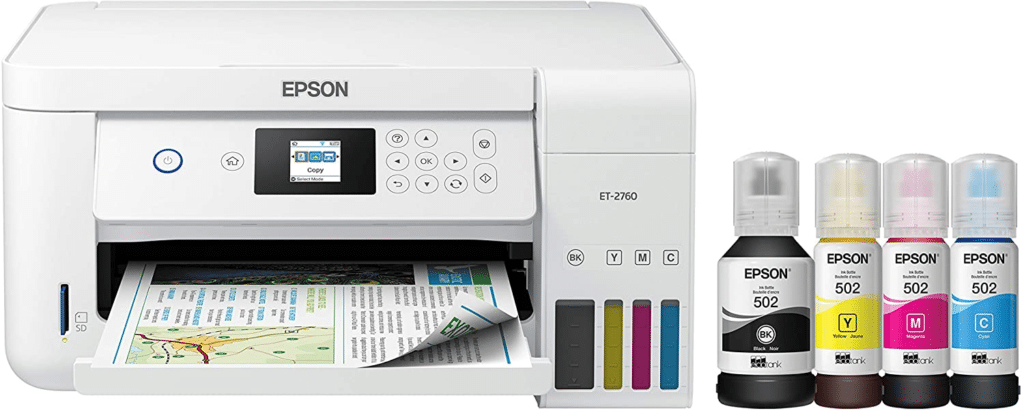
While this option features a slightly outdated design and refillable ink cartridges, the advanced EcoTank system sets the ET-2760 apart from its competitors. This model has low running costs. In addition, Epson’s five-color printing provides excellent image quality, especially when printing images on photo paper. This model comes with a 140ml Pigment Black Ink Bottle and 70ml Cyan, Magenta, Yellow, and Black Ink Bottles.
Good print and scan quality Front and rear paper feeds Creative filters Appealing design with a 5-inch touchscreen Limited print width Print speed should be improved
This version of Canon Pixma looks like a premium product with a huge color touch screen on an auto-tilted faceplate. One of the best inkjet printers for photography, the TS9120 boasts Canon’s amazing 6-ink system, which includes high-resolution printing and scanning, as well as Photo Blue for grain reduction. With black pigments and dye-based inks, the prints look particularly realistic. This printer features Wi-Fi, Ethernet, Bluetooth with PictBridge and Cloud, an SD card slot, and the ability to print labels on CDs and DVDs. The TS 9120 has the excellent build quality and design. It also comes in several color variations and has an expandable output tray.
The Epson Expression Photo XP-970 can be used as a stand-alone printer and copier or scanner with intuitive touch controls. The XP-970 is smaller, lighter, and cheaper than many similar all-in-ones. This 3-in-1 inkjet model is fairly compact, but can print on A3 size paper and uses 6 inkjet cartridges for color accuracy and shaded results. The A4 format scanner produces high-resolution scans. Combined with the high print resolution, you can get almost the same color copy. Easy printing from iPhone, iPad, Android mobile devices, and Wi-Fi Direct makes the XP-970 the perfect wireless printer for your photos. In addition, it supports hands-free and voice-activated print modes.
Excellent speed and performance Offers various ways to connect to the printer High-capacity cartridges and paper trays 35-page ADF and auto 2-sided printing Uses only genuine cartridges Not very convenient paper trays and feed
This square printer has an impressive set of features. It features 500 sheets of paper, two paper trays, and a 35-page automatic document feeder. The high-speed printing speed of the WF-3730 is by no means inferior to the printing speed of most laser printers. As an inkjet printer, it offers an impressive color range at low running costs, especially when using large-capacity Epson ink cartridges. From faxing to cloud printing, the WF-3730 has everything you need from the best printers for images.
Affordable running costs Compact 2.65-inch color touchscreen 10-page automatic document feeder Fast battery charge No output tray Bluetooth for setup only
The main features of this portable digital photo printer are scanning, copying, portable printing, and wireless printing from laptops or mobile devices. This rugged and compact device is designed for convenient printing anywhere. You can enable printing from your smartphone or tablet using the free HP ePrint mobile printing app. In addition, you can connect to the printer via intelligent Bluetooth technology and Wi-Fi Direct. Quick and easy to set up and print right out of the box. Achieve excellent results using the original HP62 ink and HP62XL cartridges. The original HP ink cartridge prints up to twice as many pages as the refilled ink cartridge.
The best photo printer we have tested is the Canon PIXUS TR8620. Its color accuracy and gamut may not satisfy professional photographers, but it still prints high-quality photos that are enough to pay attention to detail, without banding, high contrast, and vividness. Print rich colors with. It’s significantly cheaper than taking a photo at a print shop because of the high yield of color pages and the high cost per photo printing. It takes about 1 minute to print a 4 “x 6” photo. This is very fast. You can also print directly from the SD card, which is convenient for photographers. It cannot print on 2 x 6-inch 3-inch photos, but it can be used on a variety of large paper sizes and a variety of media. You can also print a custom magnet photo and paste it into your refrigerator or locker. Overall, if your main focus is photo printing at home, it’s a very good choice.
Canon PIXMA TS6420a
Type All in One Technology Inkjet Wireless Yes Color Yes SuperTank No
It’s difficult to buy a photo printer on a budget. However, the Canon PIXUS TS6420a is a good option if you want to save money. It prints great photos with lots of small images, but it stands out when you look closely. This model can print on photo paper of various sizes, including 4 x 6, 5 x 7, and 8 x 10 inches. It takes less than a minute to print a single photo. The downside of this model is that the two-cartridge system prints only about 200 pages, so you often have to buy a cartridge. If this is a problem, you may be interested in the cheap Brother MFC-J1205W. Cartridges are more expensive, but they print about 1000 pages and do not need to be replaced frequently. Unfortunately, his photos don’t look good because of the many particles and stripes throughout the image.
Canon imagePROGRAF PRO-300
Type Printer Only Technology Inkjet Wireless Yes Color Yes SuperTank No
If you are a professional, the best printer for the images we have tested is the CanonimagePROGRAF PRO-300. Images look crisp, vibrant, and rich in detail, as you would expect from a professional photo printer. It prints a variety of colors and gradients, and the colors are so accurate that you can handle color reproduction when printing logos, graphics, or other print media. With nine cartridges and a special photo cartridge that works only on glossy photo paper, you don’t have to worry about running out of photo ink when you move on to printing documents and reports. Printing takes about 2 minutes. The photos are output, but that is part of the cost of such high-quality photos. Also, because it doesn’t have a USB port and SD card slot, you can’t print directly from the camera’s memory card. If you are a professional looking for a printer that can produce excellent prints, this is the best printer for printing photos for professional use.
Note: If you need cloud storage, please visit RainX Drive
In 2026, customer expectations are higher than ever. Small businesses are no longer competing only with local players—they are competing with digital-first brands that deliver personalized, fast, and seamless experiences. This is where CRM for small business becomes not just helpful, but essential. Customer Relationship Management (CRM) software helps small businesses manage leads, customers, sales,… Read more: Why Every Small Business Needs a CRM
In today’s hyper-connected digital world, access to information is often dependent on internet availability. However, millions of users still struggle with poor connectivity, high data costs, and limited access to digital services. This is where D2M technology comes into play. Direct-to-Mobile (D2M) technology is a revolutionary broadcasting method that delivers multimedia content directly to mobile… Read more: D2M Technology: The Future of Direct-to-Mobile Content Delivery
Website Design for Educational Institutions: A Complete Guide for Modern Learning Platforms In today’s digital-first world, website design for educational institutions plays a critical role in shaping perceptions, driving admissions, and enhancing learning experiences. Schools, colleges, universities, training centers, and academies are no longer judged solely by their campus or curriculum—their website is often the… Read more: Website Design for Educational Institutions
1. Introduction: The Intersection of AI and Hair Care The global hair loss treatment market is projected to reach billions of dollars by 2030. For decades, the process of diagnosing hair loss was subjective, relying on the “naked eye” of a general practitioner or the expensive consultation of a specialist. Enter HairLens AI, a disruptive… Read more: The Comprehensive Guide to HairLens AI: Revolutionizing Trichology through Artificial Intelligence
Technology keeps evolving at lightning speed, and so does the way we work, create, learn, and entertain ourselves online. As subscriptions and software costs continue to rise, more people are actively searching for the best 5 free tools for 2026 that deliver powerful features without draining their budget. Whether you’re a content creator, student, professional,… Read more: The Best 5 Free Tools for 2026 — A Complete Guide to the Best 5 Free Tools for 2026
The fashion industry is starting to massively benefit from 3D printing. The footwear company is benefiting the most from this new production technique. It is a way for many different companies to improve their production and design process. But it’s important to have the correct 3D modeling software to boost those techniques. A shoe design program can greatly boost your shoe design process on different levels, even if you don’t wish to 3D print your items. See about how using a 3D design program could increase production if you work in the footwear industry. In this blog, we will tell you some tips on how to select the best shoe design software. “6 Best Shoe Design Software” is the topic of our blog today. Let’s continue.
Why is the footwear industry using 3D printing?
In the fashion sector, manufacturing is being used more and more. It is a fantastic way to produce both final products and samples. Why is this technology interesting to the fashion industry? It is an excellent way to design beautiful patterns with complete freedom for clothing, footwear, or even accessories. The designs are all 3D printable. However, it is now easy to print using a variety of 3D printing materials, so one will surely work for your project. Though it’s easy to employ any stiff material for accessory or shoe pieces, such as heels, flexible materials are ideal for creating clothing. This technology can present a variety of brand-new opportunities for the business.
Why is 3D modeling software required?
⦁ You can save time and money by using the right 3D program to change the model and create different versions. You will be able to change and make adjustments to your design that many times as you need thanks to such software tools.
⦁ Users can add textures or paintings to the 3D models to give you and your clients a better idea of what the final product will look like. Investing in good shoe software is becoming highly significant, it permits your customers to visualize the footwear design you’ve created.
⦁ Using 3D software can be difficult. Checking the amount of experience required to use software should have been the first point to note. Some complex programs can be too difficult for you to use if you’ve never used modeling software before, and you didn’t manage to get the perfect result. Further, you will need to confirm that the program you want to use can provide the 3D tools you need to make your footwear designs.
Note: If you want to make some adjustments to the photo just let me know. I can do it for you at a very low cost. You can hire me to edit your photo
For beginners, Shoemaster is a fantastic tool. Due to the small number of designs available, you won’t have a lot of options when using this tool. However, if you have no previous knowledge of 3D modeling, it could be a perfect solution because you can still make attractive shoe designs in both 2D and 3D. Creating personalized shoes that are fitted to your clients’ morphological features is a simple process.
A software called ICad3D+ allows people to work on both 2D and 3D designs. It is a fast and simple way to improve accuracy. According to what you require for your shoe design process—pattern engineering, 3D design, or all available options—this tool provides a variety of options.
Romans CAD is a fantastic shoe design software that can quickly produce all types of shoe designs. It is specific software that is dedicated to the leather products and footwear industries. Since it is cloud-based, the teams can work much more quickly and effectively. It is a fantastic way to help manufacturers and designers connect.
Advanced shoe design tools are also included in this unique shoe design software. If you need to create 3D models for your customers to better visualize a shoe design, that seems like a perfect solution for you. The InkXE shoe designer tool gives you access to a wide variety of customization opportunities and design elements.
In reality, the 3D modeling program Modo is used by the shoe company Keen Shoes. It is a 3D modeling software for creativity that allows the free and correct development of new ideas. Due to the shoes’ truly optimized design, this gives some advice to them in developing product concepts for the comfort of the customers.
You can use CorelDraw to work on both 2D and 3D creations. You can use some of the fantastic tools which are graphics application has to offer to make your shoe design. If you need to 3D print any shoe designs, this tool features a user-friendly display and provides many fantastic benefits.
Conclusions
We hope that this blog has helped you in selecting the best footwear designs. You can discover concepts and tools that can help you in your daily life, in the list of the top 3D modeling software for the fashion industry.
Note: If you want to make some adjustments to the photo just let me know. I can do it for you at a very low cost. You can hire me to edit your photo
In 2026, customer expectations are higher than ever. Small businesses are no longer competing only with local players—they are competing with digital-first brands that deliver personalized, fast, and seamless experiences. This is where CRM for small business becomes not just helpful, but essential. Customer Relationship Management (CRM) software helps small businesses manage leads, customers, sales,… Read more: Why Every Small Business Needs a CRM
In today’s hyper-connected digital world, access to information is often dependent on internet availability. However, millions of users still struggle with poor connectivity, high data costs, and limited access to digital services. This is where D2M technology comes into play. Direct-to-Mobile (D2M) technology is a revolutionary broadcasting method that delivers multimedia content directly to mobile… Read more: D2M Technology: The Future of Direct-to-Mobile Content Delivery
Website Design for Educational Institutions: A Complete Guide for Modern Learning Platforms In today’s digital-first world, website design for educational institutions plays a critical role in shaping perceptions, driving admissions, and enhancing learning experiences. Schools, colleges, universities, training centers, and academies are no longer judged solely by their campus or curriculum—their website is often the… Read more: Website Design for Educational Institutions
1. Introduction: The Intersection of AI and Hair Care The global hair loss treatment market is projected to reach billions of dollars by 2030. For decades, the process of diagnosing hair loss was subjective, relying on the “naked eye” of a general practitioner or the expensive consultation of a specialist. Enter HairLens AI, a disruptive… Read more: The Comprehensive Guide to HairLens AI: Revolutionizing Trichology through Artificial Intelligence
Technology keeps evolving at lightning speed, and so does the way we work, create, learn, and entertain ourselves online. As subscriptions and software costs continue to rise, more people are actively searching for the best 5 free tools for 2026 that deliver powerful features without draining their budget. Whether you’re a content creator, student, professional,… Read more: The Best 5 Free Tools for 2026 — A Complete Guide to the Best 5 Free Tools for 2026