Tag: IMAGES

  • How to Remove Background in Photoshop

    Photoshop has several tools for removing backgrounds. Some tools have to do all the work, while others do it almost completely automatically. This article describes how to remove backgrounds in Photoshop using 3 different tools.

    Use the Pen Tool

    The Pen Tool works best with simple objects. Great for selecting objects with hard lines, straight lines, and curves.

    Step 1: Select the Pen Tool

    Select the Pen Tool from the toolbar on the left. You can also use the keyboard shortcut “P”. Make sure it is set to “Path” in the top menu.

    Step 2: Draw a Path

    Click on the edge of the subject to create the first anchor point. Create a second anchor point. For straight lines, just click. If you want a curve, click and drag to make the line an arc. You can smoothly turn around rounded edges and curves.

    Be sure to Option-click (Alt-click on Windows) the last anchor point after the curve. Otherwise, the next arc will automatically depend on the previous line. If you hold down the Option key, the anchor points will be reset so you can recreate the straight line.

    It takes some practice to get the hang of it, but after a while, it goes much faster. Continue the process until you create a path around the subject. When you reach the first anchor point, click on it. The path will be closed automatically.

    Step 3: Convert Path

    In the Paths window, hit the “Load path as selection” icon.

    Step 4: Remove the Background in Photoshop

    Currently, there are several options. If you want to erase the background, go to Select> Invert and press Delete. You can also use the keyboard shortcut Cmd + Shift + I (Ctrl + Shift + I on Windows). Press Cmd + J (Ctrl + J on Windows) to copy the subject to a new layer. And now you have separated the subject in Photoshop and removed the background.

    Use the Quick Selection Tool

    The Quick Select tool does a lot of work and works best when the contrast between the subject and the background is good.

    Step 1: Quick Selection

    Select the Quick Select tool from the toolbar on the left. You can also use the “W” key shortcuts Make sure it is set to “Add to selection” in the top menu. This allows you to select different parts of an object and combine them into one selection.

    Step 2: Make a Selection

    Select either the background or the subject. Photoshop automatically selects similar tone values.

    Step 3: Refine Edges

    Click the Adjust Edges button to open a new window. The cutout is also displayed in Photoshop. You can set the background in the Adjust Edges window. Depending on the color of your subject, you can use a white, black, or transparent background to identify defects. In the top menu, set the brush size. Paint the edges of the selection and Photoshop will adjust the selection. This is useful when choosing hair, leaves, or fur. Photoshop uses the foreground and background contrast to fine-tune your selection.

    Step 4: Remove the Background

    Repeat Step 4 of the previous example to remove the background.

    easy method 2022

    Object Selection Tools

    Quick Action

    Conclusion

    There are many ways to remove backgrounds in Photoshop. It all depends on the photo you’re working on and how perfect your choice is. In any case, you need to practice all the tools Photoshop provides. First, use a simple photo. A photo with a beautiful background and a high contrast between the foreground and the background. Soon after, the background will be removed from all types of photos.

    Note: If you want to make some adjustments to the photo just let me know. I can do it for you at a very low cost. You can hire me to edit your photo

    latest post

  • Best Female Poses for Portrait Photography

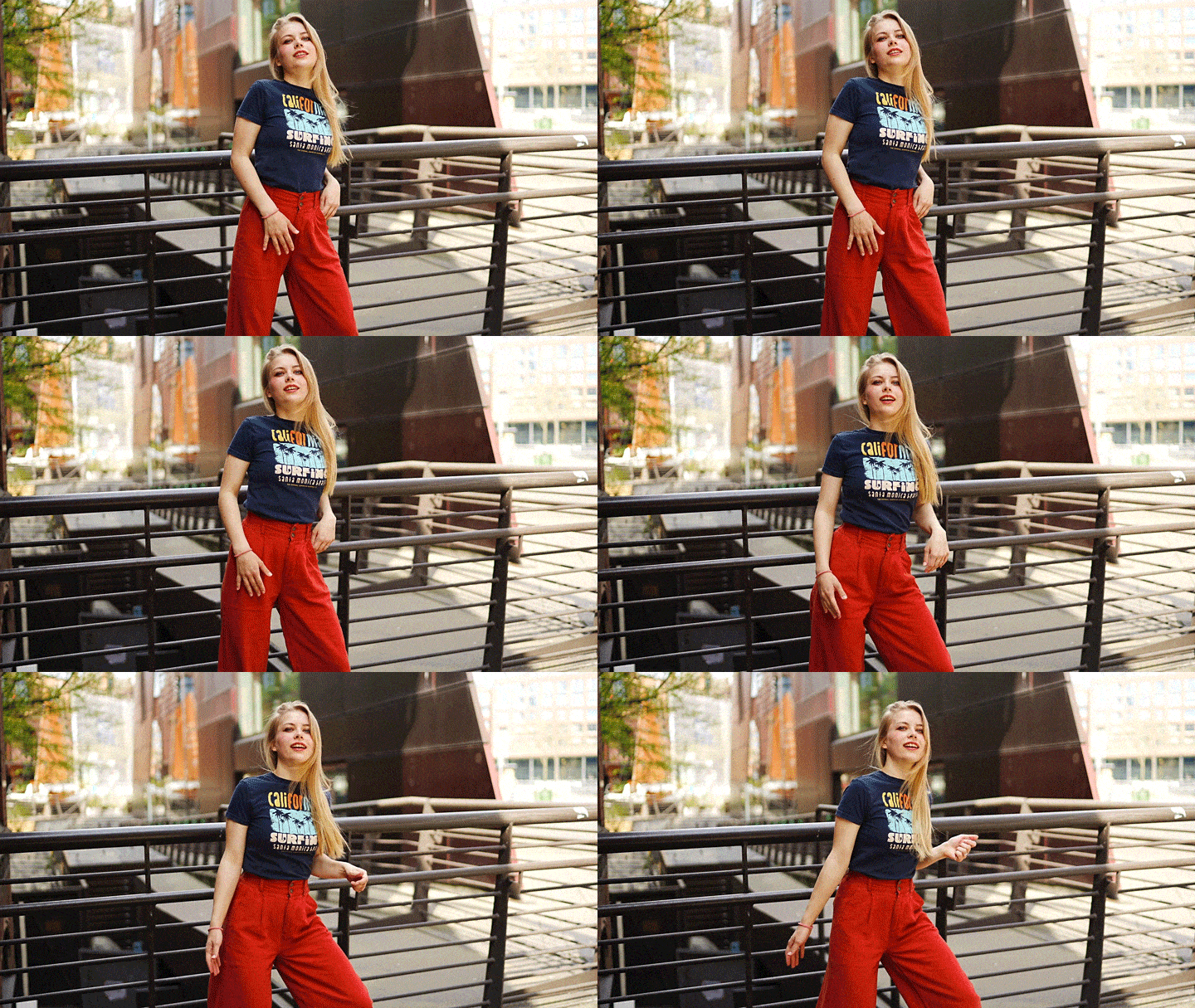
    There are different types of female poses that can create or destroy images. It is important to try different pose techniques to keep the image diverse. Here are the best poses and photography tips for women that can teach you how to effectively pose your model.

    Hands in the Air

    If you like dreamy female poses, this is for you! The model needs to raise his hand. She can close her eyes, lean on one of her arms, and look at the sky. Make sure her look is relaxed and natural. Shooting against the light can make her portrait look more like a dream.

    Flip Hair

    All your model has to do is throw her hair. Have her eyes closed so that her face doesn’t look awkward! Increase the shutter speed and take sharp pictures. If you like dreamy portraits, you can use a slower shutter speed. This creates motion blur. This is a very common female pose, but it can be included in some photos.

    Rest in your hands and look up

    This is a relaxing pose to try at the end of the photo shoot. Ask the model to put one elbow on the table and the head in his hand. Next, she needs to look up at heaven. This makes her eyes shine. It also creates a uniform amount of light on her face. These two elements allow you to take bright and dreamy portraits.

    Lean against the wall

    A casual but effective feminine pose. The model should stand in front of the wall with her back straight. Next, she needs to lean her head against the wall. This should be very subtle so that her neck doesn’t bend too much back. You can add sunglasses and other accessories to accentuate this pose.

    Look over your shoulder

    The model should be looking over the shoulder when standing or sitting. This is a very common female pose in portrait photography. It works in almost every place and in every lighting situation. Such feminine poses stimulate self-confidence and a sense of superiority.

    Rest on a soft surface

    This is one of the best relaxing photos poses for any model. The model should sit on a comfortable surface. This can be a bed, table, or sofa. She can support her head with her hands. She can also look into the distance and your camera. You can shoot at eye level or go a little higher for this feminine pose. Shooting at eye level makes the model look comfortable. Shooting from a higher angle creates sensitivity and vulnerability. These emotions work very well in emotional portrait photography.

    One hand on the waist

    This is one of the most confident female poses. The model needs to put her hand on her waist. The other hand can hold something. Drink. She can also put her free hands on her legs to create a more relaxed pose. This pose emphasizes the curves of the model and makes the model look cool.

    Raise your knees and put your hands on your feet

    This is an effective female pose for studio portrait photography. For best results, you need a comfortable stool. The model requires the knees to be close to the chest. She also needs to put her head on her knees and her hands on her feet. An elegant pose perfect for dancers. It can also be used for surrealistic and conceptual portraits. Feel free to add props to this pose. Flowers, curtains, and smoke grenades can make the pose look more elegant.

    Hand in pocket

    If you are looking for a casual standing pose, this idea is perfect for you. The model needs to put his hand in his pocket instead of standing awkwardly in front of the camera. This instantly gives her an edgy look. These are commonly used in lifestyle photography. You can use it as many times as you like without making the image look boring.

    Casually Place Elbows on Table

    Casual poses are perfect for lifestyle and studio photography. It can also be used in minimalist portrait photos. All you need for this pose is a table and some fun props. The model should place his elbows on the table and tilt his head to one side. This is how she looks relaxed. You can put a book, drink, or fruit on the table and talk about the model.

    Squats (also known as villain poses)

    This is one of the most popular female poses on social media. You may have seen them on Instagram, which is often used by celebrities like Kylie Jenner. It can give your portrait a cool and quirky look. All your model has to do is crouch. Ideally, she should lean on one of her legs and stretch the other. This creates a balanced pose and looks slim.

    Lying on the floor

    This is one of the easiest female poses to use in photography. It’s simple, yet very effective for all types of portrait photography. The subject should simply lie on his legs or do something that gives a casual and relaxed impression.

    Cozy pose

    If you’re looking for a feminine fall/winter pose, this is perfect! The model needs to cross his arms. It should look like you’re hugging. To make this pose look more relaxed, make sure the model closes his eyes and lifts his head a little.

    Extend your arm towards the lens

    This is a great female pose for creative portrait photography. It’s an easy way to make your photos stand out without trying too hard. It’s also a very easy pose for all kinds of models.

    This is the perfect female pose for creative portrait photography. It’s an easy way to make your photos stand out without trying hard. It’s also a very simple pose for all types of models. The model only needs to extend its arm towards the lens. While doing this, she can hold something like a cup. She uses a large aperture to focus on the model. This keeps her face sharp, but blurs her hands and creates foreground.

    One foot in front of the other

    There are many standing model poses. This is a popular pose that makes all female models look gorgeous. As mentioned above, ask the model to place one foot slightly in front of the other.

    Hands-on the cheeks

    This is the perfect female pose for close-up portrait photography. Her model needs to put her hands on her cheeks. The higher the symmetry, the better. She must not push her face too hard to avoid an unfavorable impression.

    One Hand on Mouth

    This is a variation of the previous pose. This time, the model just gently puts one of her hands on her mouth. You can also tilt her head to one side and open her mouth a little. This feminine pose is perfect for emphasizing hands, nails, and lips.

    Note: If you want to make some adjustments to the photo just let me know. I can do it for you at a very low cost. You can hire me to edit your photo

    latest post

  • 10 Best film cameras in 2022

    Photographers who are willing to invest money in their cameras should select the highest quality device that meets their needs. Some of the benefits of owning a film camera First, because film cameras have a higher dynamic range, white and dark details are better captured. Second, film photography is more adaptable in terms of focusing and exposure. Finally, unlike film cameras, most digital cameras lack high-resolution capabilities. On my list, I will explain to you the “10 Best Film Cameras in 2022” for students, photographers, or professionals. Let’s begin.

    What is the best way to choose a film camera?

    When selecting the perfect film camera for the job, there are some things to keep in mind. It is because I’ve included a “film camera guide to buying” in this article to help the reader come to conclusions. image quality, manual mode, lenses, battery life, and cost.

    Picture Quality

    When buying a film camera, the very first factor to keep in mind is the image because that is the most important element of this device. It will help you to have an excellent image and photos of yourself and also display how expert you are at doing work. Its high-quality film camera is one of the reasons it is popular with creatives and professionals.

    Battery

    The flash, light meter, and shutter in some film cameras all require batteries. Keep in mind you never miss another photo opportunity by having a solid power source. However, it’s not like all film cameras need a battery, but you should think about it because there are a few benefits for you.

    Price

    You must consider the price because, if you do not have a large budget to invest in, users can start looking for a low-cost and high-quality film camera. Students and creatives who cannot afford a high-end movie camera can use a low-cost but high-quality camera instead.

    Manual Function

    The Manual option allows you to physically adjust your camera’s shutter speed, aperture, or ISO. You have full creative control over everything from the aperture or shutter speed to the luminance of your photos and videos if you only shoot in manual mode.

    Note: If you want to make some adjustments to the photo just let me know. I can do it for you at a very low cost. You can hire me to edit your photo

    Nikon F6

    ⦁ It is a photography-friendly SLR camera, including an interconnected motor autofocus mechanism or a focal-plane shutter.

    ⦁ The best all-around film camera in 2022? It has a clear BriteView Matte II display and is also suitable with six additional focusing screens.

    Configuration
    ⦁ Size: 3.1 x 6.2 x 4.7 inches                        
    ⦁ Film format 35mm
    ⦁ Color of the film: Coloured
    ⦁ Exposure Control Type: Manual, Automatic

    Advantages
    ⦁ Excellent for exposure
    ⦁ Excellent image quality
    Disadvantages
    ⦁ Costly

    Olympus OM1

    ⦁ Are you searching for a professional-looking film camera of high quality? There’s no need to search for anything more. The Olympus OM1 is the camera for you. The best professional film camera.

    ⦁ If you want the best camera for your profession, the Olympus OM1 is now an excellent choice.

    ⦁ This model is all about a small, weather-sealed camera with all abilities and features of a filled professional camera.
    ⦁ It also includes Cross Quad Pixel AF, which provides 1,053 cross-type, 100% high-precision focusing points.

    ⦁ Furthermore, customers will be able to experience a 3x increase in processor speed while using the TruePic X engine.

    Configuration   
    ⦁ Size 5.3 x 3.6 x 2.9 inches 
    ⦁ Form Factor: Mirrorless
    ⦁ Frame rate: 120fps (Frames per second)
    ⦁ Types of Exposure Control: Automatic, Manual

    Advantages
    ⦁ The image quality is excellent.
    ⦁ Lenses that are easy to focus

    Disadvantages
    ⦁ Costly

    Canon Sure Shot

    ⦁ If you’re a smartphone photographer searching for a portable film camera, this is the camera for you.

    ⦁ It has a completely automated small 35mm camera with a double focal length lens and is perfect for filming and photographing tourist destinations.

    ⦁ A big Simple View real image viewfinder is also available for use with eyeglasses.

    ⦁ If you’re looking for the best travel camera, the Canon Sure Shot is an excellent choice.

    Configuration
    ⦁ Dimensions: 2.2 x 5 x 2.7 inches
    ⦁ Film format: 35mm
    ⦁ Exposure control type: Automatic
    ⦁ The color of the film: Black-and-White

    Advantages
    ⦁ Flexible
    ⦁ Excellent image quality

    Disadvantages
    ⦁ The battery life is average

    Pentax K1000

    ⦁ The Pentax K1000 is the best movie camera for people searching for a portrait device.

    ⦁ The Pentax K1000 35mm SLR camera is also one of the greatest, most popularly used, and most long-lasting cameras in photography history.

    ⦁ On the other hand, to take a picture with the Pentax K1000, users do not have to turn the meter or camera on or off.

    Configuration
    ⦁ Dimensions: 7.72 x 4.29 x 4.29 inches
    ⦁ Film format: 35mm
    ⦁ Type of Exposure Control: Manual
    ⦁ Film color: Black and white or color

    Advantages
    ⦁ Excellent image quality
    ⦁ There are no batteries required

    Disadvantages
    ⦁ Making a noise

    Olympus OM-10

    ⦁ For experts searching for the right film camera for vintage photos, the Olympus OM-10 is a must-have.

    ⦁ This Olympus OM 10 SLR 35mm film camera comes with Zuiko 50mm f/1.8 prime lens, a UV filter, or brand-new batteries.

    ⦁ The camera body has too few small minor scratches on the bottom, but it is in excellent condition.

    Configuration
    ⦁ Size: 7 x 4 x 4 inches
    ⦁ Film format: 35mm
    ⦁ Exposure control: Manual
    ⦁ Weight:  1.35 pounds 

    Advantages
    ⦁ Lightweight
    ⦁ Excellent image quality

    Disadvantages
    ⦁ Parts are difficult to replace

    Canon AE Film

    ⦁ The Canon AE Film is one of the movie cameras for professionals, especially for night photography.

    ⦁ It has a 35mm focal-plane shutter SLR camera or a single-lens reflex (SLR) camera including an electronic control AE (Automatic Exposure).

    ⦁ On the other hand, the Camera is fully automatic and uses full-aperture meter reading with Canon FD series lenses.

    Configuration
    ⦁ Size: 7.8 x 4.4 x 4.4 inches
    ⦁ Film format: 35mm
    ⦁ Exposure control: Manual
    ⦁ Weight: 1.95 pounds 

    Advantages
    ⦁ Budget-friendly
    ⦁ Excellent 35mm photography

    Disadvantages
    ⦁ Heavyweight

    Fujifilm Instax Mini

    ⦁ The Fujifilm Instax Mini is an outstanding choice for students looking for a high-quality movie camera that is appropriate for their needs.

    ⦁ The camera sets the level of flash and the shutter speed depending upon the brightness of the surroundings.

    ⦁ So, when the shutter switch is depressed for up to 10 seconds, a light path can be captured to use an On/Off button for the light bulb.

    ⦁ Children mode has a fast shutter speed for capturing images of children, pets, as well as other animals which run fast.

    Configuration
    ⦁ Size: 3.61 x 2.25 x 4.5 inches
    ⦁ Film format: 6×8
    ⦁ Minimum Shutter Speed: 1/8 sec
    ⦁ Weight: 0.65-pound
     
    Advantages
    ⦁ Excellent landscape mode
    ⦁ Budget-friendly

    Disadvantages
    ⦁ Battery life is limited

    Lomography La Sardina

    ⦁ The best movie camera for beginners is the Lomography La Sardina including an 89-degree ground wide-angle lens.

    ⦁ This film camera captures all the required steps in such a tiny format which is both useful and unique in looks.

    Configuration
    ⦁ Size: 9.29 x 6.69 x 3.54 inches in
    ⦁ Film format: 35mm
    ⦁ Weight: 1.41-pound
    ⦁ Focal length lens: 22mm

    Advantages
    ⦁ Ultra-wide lens
    ⦁ Cheap cost

    Disadvantages
    ⦁ Images that are out of focus

    Holga 120 WPC

    ⦁ If you’re a creative videographer searching for a movie camera at a decent price, then Holga 120 WPC is for you.

    ⦁ With such a horizontal exposure angle of 120 °, the camera provides a highly wide panoramic view that is great for photographing.

    Configuration
    ⦁ Size: 9.8 x 5.3 x 5 inches
    ⦁ Film format: 6×12
    ⦁ Exposure control: Automatic
    ⦁ Minimum Shutter Speed: 7 seconds

    Advantages
    ⦁ Excellent exposure time
    ⦁ Simple to use

    Disadvantages
    ⦁ It has a mushy texture

    Lomography Diana

    ⦁ Last but still not least is the Lomography Diana, the high-quality film camera invented for documentary use.

    ⦁ This film camera also includes an integrated flash with color flash capability.

    ⦁ The Lomography Diana is one of the movie cameras for broadcast as well as story use.

    Configuration
    ⦁ Size: 7 x 3.25 x 5 inches
    ⦁ Color of the film: colored
    ⦁ Type of Exposure Control: Manual
    ⦁ Weight: 2.25-pound

    Advantages
    ⦁ Budget-friendly
    ⦁ Wide image capacity

    Disadvantages
    ⦁ It is difficult to use

    Conclusions

    It’s tough to tell which is the best since every film camera mentioned here is great. I believe that is helpful to all.

    Note: If you want to make some adjustments to the photo just let me know. I can do it for you at a very low cost. You can hire me to edit your photo

    latest post

  • How to take good pictures-08 Absolutely sure steps

    The biggest question for a new photographer is “How do you take good pictures?”. If you try to learn all about the camera in one session, you will lose. altogether. Cameras are complex and take time to fully understand and understand. With my advice, start with these 10 simple steps. You will soon learn the rest. Start taking better pictures today.

    Like most people learning manual mode

    when I bought my first digital camera, I had a hard time understanding it. Why can’t I stay in priority mode? Manual mode is similar to the use of older SLR cameras in the 1960s before buttons such as Shutter Priority and other modes did everything. The only option the photographer had to learn was to use the camera manually. The camera worked. Understanding how to use the camera correctly makes it much easier to identify and fix errors. Priority mode is appropriate in some situations. However, if you learn how to take pictures manually, you will find that you don’t need them and you can start taking better pictures yourself.

    Note: If you want to make some adjustments to the photo just let me know. I can do it for you at a very low cost. You can hire me to edit your photo

    Learn basic composition techniques … then forget about them

    This may seem a bit strange, but let me explain … Basic composition techniques such as the rule of thirds and the use of readers. Once you’ve learned, start everything differently. Even if you don’t have a camera, you’ll start thinking about how to frame your photos. This knowledge remains with you and helps you to subtly improve your photos from good ones to great ones. Now, why do you have to forget them? Simple. As a photographer, this gets too interesting and makes me tired of photography. One of the biggest challenges of photography is to keep it fresh and interesting. This can be achieved by pushing the boundaries of the “rules” of photography.

    There is no flash on the camera!

    Please note that this cannot be emphasized enough. On-camera flashes (especially pop-ups) are not very attractive to the subject and make the image very smooth. It could be from a DSLR camera or iPhone. If the light comes from the same angle as the lens, the natural shadows of the scene disappear. A photo with a built-in flash may have been taken with a mobile phone. When I started, I hated pop-up flashes, so I didn’t think of myself as a “flash” person. This continued until a friend persuaded me to buy an external flash. I finally saw what I was missing-buy now! Using natural light as the only light source, you can go a little further to find a better image.

    Finding a New Perspective As a tall person

    always adjust your height when you take a picture so that you don’t look down on it. When you follow professional photographers on social media, you may find that they always open up new perspectives. The road to professional photography. Would you like to attach the camera to a tripod, use the ground, or walk in the crowd? Keep your photos fresh by keeping a fresh perspective.

    Zoom closer with your foot

    I am my own telephoto lens. You too! Instead of zooming in, take a picture. Looking at things from a different angle gives you a different perspective. A detail that is usually overlooked in search scenes, and if you really need the best photos, make them your subject. Think before you shoot. Otherwise, you will forget to think at all.

    Clean up the background

    the background Be careful not to clutter the background as it is as part of the photo as the subject. After moving the camera a few times, it can be important to get a clean shot. Think about what’s in the viewfinder or screen. Ask yourself if you want to add something to make each element a great photo. If the answer is no, then something is stolen from the photo. tree branches, sky, and other people are just a few examples to watch out for. The branch in the image below really bothers me. You can use photo editing software such as Photoshop and the camera app.

    Practice, practice, practice!

    Rome wasn’t built in a day. If you want to be good at something in your life, you have to work hard for it. They are not free It is so much fun to play. You will still sometimes think you are smoking, but with just a little practice you will always start seeing the results in your pictures. Follow the steps above to review some of the tutorials on this website. I don’t have time to become an expert in this field. Ready to post the best social media images to boost your business.

    Use the Histogram

    LCD displays for digital cameras that use histograms are getting better and better these days, but when it comes to displaying photos, the environment at hand isn’t enough. The histogram is a photo-like mathematical representation. It is well exposed. It’s a great foundation for improving your photos (don’t worry, it’s not as complicated as you might think) It’s no use waiting until you get home and find your photos aren’t good! Please check this out for details.

    Note: If you want to make some adjustments to the photo just let me know. I can do it for you at a very low cost. You can hire me to edit your photo

    latest post

  • How to colorize old ( Black & White ) photos – Photoshop

    All you need is a basic understanding of Photoshop to properly color correct black and white photos. You can use this method to understand better colors and give old photos new life. This blog will explain “How to Colorize Old (Black & White) Photos – Photoshop Tutorial.” Let’s wait and see.

    What You’ll Want

    ⦁ Photoshop or a similar software, such as GIMP, in any version. Even if some of the tools are new, you must be ready to follow through this guide.

    ⦁ A picture in black and white.

    ⦁ Begin with a simple picture which is not submit detailed. It will allow you to improve while also fun.

    ⦁ A knowledge of the period of time shown in your image If the photograph is old, you’ll need
    ⦁ to know what colours were like in the earlier. It will verify that your results are completely correct.

    Start with cleaning the photos

    ⦁ In Photoshop, open the picture. If it’s an old photograph, there’s a good chance it’s covered with dust and blemishes. If the picture is new, it may still have faults that affect the colouring process.

    Note: If you want to make some adjustments to the photo just let me know. I can do it for you at a very low cost. You can hire me to edit your photo

    ⦁ By using Patch tool, you can easily delete all. It’s easy to do separate by making a new background layer, but it is not required.

    ⦁ Keep in mind that the original is selected at the centre of the display before selecting the Patch tool. Drag the problem to a clear spot by circling it and moving it there. The blemish will be repaired by the area you dragged.

    Increase image contrast

    ⦁ It is a very simple process which needs just a few tools of one’s choice. Easily increase the contrast and create some changes to make one’s picture more vibrant.

    ⦁ Press on the adjustment layer of the bottom of Layers box to use it. Users can use a number of tools, but I suggest that you can use curves or levels.

    ⦁ Reduce the brightness of the adjustment layer if the outcomes are just too harsh.

    Change to CMYK for vibrant colors

    ⦁ To use CMYK mode it will make the whole of one’s colours extra colourful and make it easier to fill any black and white spaces.

    ⦁ Go to Image > Mode > Colour CMYK.

    ⦁ A window will open. Select between Flatten or Merge.

    Colour each part of the image

    ⦁ It’s time to colour your picture. Select Solid Colour by clicking on the adjustment layer symbol twice. Choose a colour to work with first.

    ⦁ Don’t be too worried about finding the right colors. Users can change it at any time by double-clicking the colour inside the layer as well as changing the hue.

    ⦁ Layer mode must be fixed to Soft Light. To rearrange the layer mask (the white box next to the new layer), click Command + I or Ctrl + I.

    ⦁ Users can also use the following steps to replace the layer mask.

    Use the Brush Tool to paint over the image

    ⦁ Change the softness and size of the brush tool. There are also no hard and fast rules for this stage.

    ⦁ To cover almost all of the image, use a soft brush with 100% shading.

    ⦁ Users can begin with a rough ‘foundation’ to avoid putting out black and white areas.

    ⦁ Choose the layer mask and set the foreground colour to white. Press the X key on your keyboard to turn between black and white.

    ⦁ When you’re finished with one part of the image, start creating another adjustment layer, and choose a different colour, and repeat in step 4.

    ⦁ To remove errors, click X to make black the foreground colour as well as paint over the areas you want to remove them.

    ⦁ When something doesn’t look perfect, users can always change the colour hue or the saturation of the layer.

    Try new colours to get realistic results

    ⦁ Sure, users didn’t paint three different images and hope it would look real. Try different tones, such as unique colours. Start by creating many more solid colour adjustment layers just as you wish.

    ⦁ For skin colours, for example, users must use purples, blues, and yellows so that skin does not appear dull.

    ⦁ If using odd colours, make sure to reduce the shading of the layer so that the image does not appear unreal. Sometimes subtle colours can make a major difference.

    ⦁ As users update, look over a few different coloured pictures to see how different colours function together. It is an excellent way to improve one’s understanding of colours as well as their ability to capture them in photography.

    Use others tools to Improve better colour

    The End Result

    Now, you’re finally complete! Start colouring images to boost your colouring strategy. Save the image as a Photoshop (PSD) file if users would like to go back and focus on it again. All of the layers will be stored here as a result. Such a method is suitable if you are a high achiever or simply need a break from painting one image.

    PHOTOSHOP COLOURING EASY METHOD

    Conclusion

    You don’t really need a degree and years of work experience to bring black and white images to existence. You can use this method to restore old family photos, experiment with unique colours, or even change your view of colour combinations forever. I hope the above method is beneficial for you in the upcoming years.

    Note: If you want to make some adjustments to the photo just let me know. I can do it for you at a very low cost. You can hire me to edit your photo

    latest post

  • How to Make an Animated GIF in Photoshop

    A GIF is a moving picture. A GIF is a small video clip or a collection of still pictures that appear to move. GIFs do not have to be difficult in order to function properly. Sometimes, simple movement is appealing. GIFs are popularly used in marketing or to produce memes, mostly to create a visual aid or to make a statement. In this article, you will learn how to make an animated GIF in Photoshop. So, let’s start.

    Know Photoshop

    To start, explain Photoshop because these features are professional ways done in Adobe. Adobe Photoshop is a computer image editing software created by Adobe Inc. Photoshop is commonly considered as one of the most powerful photo editors currently available. It has advanced features that will appeal to a wide range of artistic beginners and professionals.

    I’m starting to make animated GIFs from pictures.

    By combining two or more images, GIFs give the effect of motion. Most of the parts in the image will remain the same. However, at least one element changes between images. It could be an object or a person that is starting to move. An animated GIF is not hard to create. One frame may comprise a message or logo, while the other is not. A sequence of still pictures taken as part of a time-lapse can be used. Alternatively, you can make those changes super simple in post-processing. A GIF with several images in motion is smoother. very few frames with bigger movements look like stop-motion motion graphics.

    Note: If you want to make some adjustments to the photo just let me know. I can do it for you at a very low cost. You can hire me to edit your photo

    Animated GIFs from pictures

    step 1: Select Images

    Select the images for use in the animated GIF. To create the illusion of motion, just pictures are needed. But you can also select up to 100. It totally depends on you. However, if you have more than 100 images, your GIF could take quite a long time to load on a website. Let’s create a GIF in Photoshop that relates to a picture before and after unique post-processing phases.

    step 2: Open the images as layers

    ⦁ Upload the files into Photoshop as separate layers. Highlight the pictures in Lightroom and choose the Picture drop-down menu. Go to Photo > Edit in > Open as Layers in Adobe Photoshop.
    ⦁ If users open files directly in Photoshop, it means saving those in the same folder. In Photoshop, go to the File menu and select “File > Scripts” to load files into a stack.
    ⦁ Next, select Browse and browse to the pictures that will contain your GIF.
    ⦁ Click “Open,” then OK.
    ⦁ Users can auto-align layers by choosing Edit > Auto-Align Layers from the Edit drop-down menu. Users have many options, but auto is generally sufficient.
    ⦁ Duplicating a layer allows you to add text and images. By choosing the Layer drop-down menu, users can combine text with the duplicate layer. Choose Layer > Merge.”

    step 3:website image size

    Photoshop can open RAW images as well as other file types. However, all of those extra pixels are useless while creating a GIF. Large images slow down the graphics and create a file too big to display on the web. A GIF must be 480 pixels on the longest side. Even so, it is possible to make it as large as 720 pixels.
    ⦁ Choose an image from the drop-down menu.
    ⦁ Choose an image > Image Size.
    ⦁ Enter the smaller pixel size in the Size of the Image window. and then click OK.

    step 4: Create a Frame Animation

    When working with video or animation, you’ll require Photoshop’s Timeline window.
    ⦁ Go to the Windows drop-down menu to open it.
    ⦁ Navigate to Window > Timeline.
    ⦁ At the bottom of your workspace, a new Timeline window will appear.
    ⦁ Choose the arrow inside the center point of the window.
    ⦁ From the menu, select Create Frame Animation.
    ⦁ The top layer will be visible in the Timeline window.

    step 5: Creating Frames with Layers

    To see all the layers, right-click lines in the Timeline window’s top right corner. It helps bring up a new menu.
    ⦁ Select “Create Frames from Layers.”
    ⦁ In the Timeline window, the layers appear as individual frames. Users should be able to see all of the layers.
    ⦁ To change the structure, drag the images to a new place.

    step 6: Set a timer for each Frame

    By mistake, the time shown below each frame is 0 seconds. Under every frame.
    ⦁ Click the mouse cursor next to “time.” You can change the time for personal frames or for all frames instantly.
    ⦁ To see a preview of your GIF, press the Play button.
    ⦁ Experiment with various time settings.
    ⦁ Select short times if you have a variety of images and want to have a smooth motion.
    ⦁ Choose a longer time if you want a stop-start effect. A GIF’s total time must be around 6 seconds, though the loop can be smaller. Many GIFs contain a single sign or motion, which can last not much more than a second.

    step 7: Select the Loop

    By mistake, the GIF will play endlessly.
    ⦁ Open the loop control menu to change it.
    ⦁ You have the option to play the GIF once, twice, or three times, as well as choose some other option.
    ⦁ To show your GIF, click the Play button once again.

    step 7: save for the web

    Go to the File drop-down menu and save your gif image file for the online platform.
    ⦁ Navigate to File > Export > Save for Web(Legacy).


    ⦁ Select the GIF 128 Resampled present and save for the Web window.
    ⦁ It decreases the number of color options in your picture and makes the GIF load faster. Even so, the color gradients in one picture are mostly maintained.
    ⦁ When you click the Preview button, one GIF will open in a new window in your web browser.
    ⦁ Save the file. Select an area and click Save once more.

    Animated GIFs from a Video

    Creating an Animated GIF from a Video. Now you know about the video gif. In Photoshop, you can make an animated GIF by looping short videos. Users only need a very few seconds of video. The most difficult part is choosing where to start and end the loop.

    step 1: Open the video in Photoshop

    You can open a full video or even just particular parts in Photoshop. Users can also transfer individual frames from the video. Lightroom will offer video clips. However, you cannot export a video from Lightroom to Photoshop.
    ⦁ Go to the File drop-down menu and click File > Open to open the content directly in Photoshop.
    ⦁ Navigate to the video file and press the Open button. Its video will automatically open inside the timeline window.
    ⦁ Go to the File menu to import chosen frames from a video.
    ⦁ Select File > Import > Video Frames to Layers from the menu. Then navigate to a video file and press the Open button.
    Almost all video files are captured at 30 frames per second. However, you do not want these several frames to make a GIF. So pick the “Limit to each and every” option and enter a value. Each of four or five frames is enough. To achieve the desired motion, use the smallest number of frames possible.
    ⦁ Select the Make Frame Animation checkbox. and then click OK. Each frame of the video is again converted into a layer.
    ⦁ Then, repeat the previous steps to make a GIF from still images.

    step 2: Resize for the web

    When GIFs are small video files, they run faster. So, go to the Image drop-down menu and change the size of your video for the internet.
    ⦁ Choose an image > Image Size.
    ⦁ Fill a size between 480 and 720pixel resolution on the long edge of the Image Size window. and then click OK.
    ⦁ You may receive a message that converting a video layer to a virtual hardware layer is needed. Select Convert.

    step 3: Select the GIFs frames

    Set the start and endpoints to support the short video you can use as your GIF. Once more, six seconds is an outstanding time duration for a GIF, though the loop could be smaller. Play the section a few times on loops. Make a note as to how the clip looks when it loops back to the start. Several GIFs start and stop suddenly. The jolt can be lowered by slightly trying to shift the start or end positions.

    step 4: Save for the Web

    Go to the File drop-down menu and save one animated GIF file for the web.
    ⦁ Navigate to File > Export > Save for Web (Legacy).
    ⦁ When you click the Preview button, one GIF will open in a new web browser.
    ⦁ Save the file. Select an area and click Save once more. You get a video loop now.

     Save for the Web

    Conclusion

    If you use a sequence of pictures or short video clips, you can easily create animated GIFs in Photoshop. In the Timeline window, select the Generate Frame Animation command. Then, save the GIF to the web. Don’t be upset if your GIF isn’t ideal. There is a culture of animated GIFs that have a handmade images. This is due in part to the restrictions of the GIF format. It’s become a standard GIF look.
    Upload your GIF created in Photoshop to social media or your website. It must work smoothly. GIFs could be included in emails. They can even be found in Word documents. We hope knowing How to Make an Animated GIF in Photoshop was simple.

    Note: If you want to make some adjustments to the photo just let me know. I can do it for you at a very low cost. You can hire me to edit your photo

    latest post

  • Image editing services

    A photo is said to be good enough to justify a thousand words, or a well one usually says a million things at once. Image editing services are fastly becoming the most companies outsource processes in the industry in today’s competitive business environment, in which pictures have the power to promote a brand or a business. The public is becoming more and more image-centric, so they’re more ready to react to pictures, making high-quality images a useful tool for branding and increasing sales. Image editing services help with this. So, we’re starting to talk about image editing services in this blog. Let’s get started.

    What is the concept of a photo-editing service?

    A photo-editing service is basically a companies outsource that edits your pictures. A lot of time and effort goes into being a photographer. It requires not only taking and editing pictures but also communicating with clients. In fact, as per recent research, photographers actually spend 30 % editing photographs, nearly 2 – 3 times as much as they do shooting them. A photo-editing service’s role is to help photographers who appreciate their time by taking on the difficult task of editing pictures to make them the best and more attractive. Image colour correction, photo reconstruction, real-estate photo editing, portrait image editing, and high-end photo retouching are all examples of image editing services.

    What services are generally given?

    Photo retouching, corrections, and manipulations are generally the focus of a usual photo retouching company. Among some of the services are:

    ⦁ A more positive perception of real estate

    Photo editing services improve the professional standards of real estate images by improving the background to provide a more accurate picture of the property, removing unnecessary elements, controlling the brightness, cleaning the background of images, adjusting the contrast to make it much more look more professional for clients, changing the scenic views, altering the overall light shade, and going to add shadows to get a more natural look.

    ⦁ Retouching of photographs

    It uses a number of techniques to return dull and discoloured photos to their original condition. Photographs which have been destroyed by rips, wrinkles, fungus, water, or fire are repaired, as well as black-and-white images are colourized.

    ⦁ Image enhancement

    Colours are changed, spots or dark spots are removed, product photos are retouched, visibility mistakes are fixed, marks and scratches are deleted, the topic totally fits into the background, and the as a whole description of the photos are improved. These things can be do better only a photo editor.

    Note: If you want to make some adjustments to the photo just let me know. I can do it for you at a very low cost. You can hire me to edit your photo

    ⦁ Background change

    Removing the picture’s background, looking to add a drop mask to add simplicity, putting an image shadow or mirror image to create a 3D effect, as well as simply click images with Illustrator Pen Tool.

    What is the benefits of hiring a photo editor?

    ⦁ Cost-effective

    Photo editing takes a lot of time, so for photographers and businessmen similar, hiring a photo editing services provider to do the job makes things easier. It helps save time, money, as well as hard work whereas operating your business. Photographers and company owners can focus on many other areas of operations, like as taking photographs and maintaining and working with new and future customers.

    ⦁ Higher sales

    The primary goal of photo editing is to continue improving the attraction of a photograph, and a best-edited photograph speaks a lot about a company or brand. Photo editing services and ensure that your product is viewed in the most attractive possible manner. As a result, you’ll have an unique opportunity to create more sales.

    ⦁ It increases creditability

    Photos are always an important part of any branding and marketing function, and using high-quality pictures is an excellent way to promote your brand’s reputation. Building a brand needs images. Customers are more likely to trust a company that creates high-quality images with the help of an image editing service.

    ⦁ Getting the Finest talent

    Photograph editing with your own can be getting more difficult because you may be unaware of multiple techniques that will help you boost the attraction of your photos. Professional editors, on the other hand, will be well-versed in the numerous different tools and software used in photo retouching. They can help you improve the visual effect of your photos without taking away from the original beauty.

    ⦁ Outstanding Work

    For e-commerce websites, quality is very important. When buying a product from an e-commerce site, consumers will explore the images to decide the features of the product. Their decision could be simply based on the pictures on the website. As a result, you must guarantee that the images are of high enough quality to help you rise out between your competing companies.

    What features makes a best photo editing provider?

    ⦁ Cost

    Cost is really a factor. You really would like to hire an editing company that fits your budget while still providing high-quality work. Search on the internet around you and compare each price from multiple companies. After that those best under your budget hire him.

    ⦁ Professional experience.

    Like a photographer or company owner, you want to hand over control your pictures to a company with such a reputation in the field. Before using their services, Search the company, read customer feedback, as well as look at samples of their work.

    Salary of photo editor?

    Inside the United States, the average salary for a Photo Editor is $53,400. A Photo Editor makes money an average hourly wage of $25.67. New York ($96,213), Rhode Island ($91,796), Connecticut ($96,213), and Massachusetts ($96,213) are the top paying states for Photo Editor. The highest paying sectors for photo editors are media, professional services, and sales.

    How to Be a Photographer/Photo Editor?

    Starting out as a photographer is one of the most common tracks to becoming a professional photo editor. There are many following reasons for this

    ⦁ Basic photography understanding will help you to understand how camera settings and trying to shoot conditions affect the editing available options to you.

    ⦁ Understanding photography fundamentals will help you in creating good editing choices.

    ⦁ When you don’t have any experience create and edit other photographers’ pictures, it can be challenging. Going to practice editing and developing a portfolio will be simpler if you start taking your own photographs.

    ⦁ If you get the chance to guide the photographers you work with as an editor, having previous photography experience can help you express clearly what you want to see in a photo.

    Conclusion

    In today’s global world, using a photo editing service has known to be a cost-effective way for photographers or businesses to meet their goals. We all know you go to wedding ceremonies, birthday parties, events, and other social functions. Now a day, clicking pictures is necessary. 50% of the world’s population uses social media. Everyone desires good pictures to post on the internet, but they are unable to do so due to the absence of editing skills. That’s also why image editing services and editors are in demand these days.

    Note: If you want to make some adjustments to the photo just let me know. I can do it for you at a very low cost. You can hire me to edit your photo

    Latest post

  • 31 Incredible photography techniques and photo tutorials

    Photography is a skill that can’t be learned in a single day. Because most of them think that learning to take photos automatically qualifies people as a photographer. In order to be a good photographer, you must clearly show a range of techniques, tools, and creativity. I’m going to share 50 Incredible photography techniques and photo tutorials in this post. Let’s start.

    REFLECTION

    This is a popular photography technique among many photographers because it is simple and still creative. Discovering a reflective surface is the most important requirement, but it is not the only one. Search for surfaces that reflect light well, such as flat water, glass, marble, or even a regular mirror. Reflecting images looks very attractive.

    SILHOUETTES

    You get silhouettes when taking photographs against the light. Beginning with a cool shape and making sure the background is lighter than the object is the major factor. To verify that the silhouetted object stands out against the bright background, you’ll normally need to photograph from a low angle and then upward toward the sky. When photographing silhouettes, make sure to highlight the bright background. As a result, the subject will become a dark silhouette.

    REPETITION

    It is useful to generate your own repetition. It is something that can be completed in both natural and artificial setups. Repetition can be seen in a line of trees or many bricks in a wall. The high level of repetition creates a texture. It’s trendy right now, and it’ll help you take your photography to greater levels.

    Note: If you want to make some adjustments to the photo just let me know. I can do it for you at a very low cost. You can hire me to edit your photo

    REFRACTION

    Refraction photography is a type of photography that captures the refraction effect, in which light is bent on glass, water, or any surface to misrepresent or enlarge a subject. Photographs of refraction can be creative, imagination, and just beautiful.

    FRAMING

    Framing is pretty basic stuff like seeing your image through a frame, such as a doorway, a window, or the leaves of a tree. What exactly is this? A strong, graphical composition is framing your subject within another. The goal is to use the frame component to improve and complement the subject. Shooting through a doorway, pulling back curtains, branches, fences, tunnels, and so on are examples of framing photography.

    CONTRAST

    Color photography involves the use of media that can capture and recreate colors. The use of contrast black and white or colored photography, on the other hand, lists only one channel of brightness and uses media that can show colors.

    PANNING

    The technique of starting the camera shutter but then just horizontally moving the camera before the shutter gets closed is known as panning in still photography. Using ongoing shooting, press the shutter button well before the subject shows up at your chosen place, and start shooting until the subject has crossed through it.

    POINT OF VIEW

    The viewpoint from which the camera views the scene is termed the point of view in photography. Are you looking below at the subject? Are you doing some research on the topic? What is your closeness to the subject? It mainly focuses on the object you want to capture.

    SHADOWS

    Because a shadow is the absence of light, it is used in photography to create contrast and grading. When something stands between the beam of light and the surface, a shadow is created. If the light falls on the object at the same angle, a dark shadow with well-defined edges will result. It is mostly used in photography for amazing pictures.

    LINES

    A line is an ongoing spot that indicates motion. Lines are open and draw the viewer’s attention into a photograph or to an especially interesting spot inside it. Put the topic at the junction of multiple interconnected lines from opposite directions. It can create a great picture to attract anyone.

    Note: If you want to make some adjustments to the photo just let me know. I can do it for you at a very low cost. You can hire me to edit your photo

    MINIMALISM

    Minimalist photography is defined by its extraordinary, old-fashioned simplicity. It focuses on the tiny object in the composition process and underlines simplicity. These types of images attract people to capture more pictures.

    HIGH SPEED IMAGE CAPTURE

    High-speed photography refers to images captured with an exposure duration of 1 millisecond (1/1000 of a second) or less in still photography. When you want to take good photos of moving objects, you can use high-speed photography. Objects that move quickly are interesting topics for this type of photography. It’s like you’re snowing a specific scene in time and recording it with someone’s camera.

    TILT- SHIFT PHOTOGRAPHY

    The tilt effect changes the picture’s focal point, while the shift effect changes the image’s point of view. On the camera’s body, you can keep moving the lens up or down and side to side using the change button. The picture plane moves with the lens, so the camera records various areas of the total image. Tilt-shift photography is just a creative and unique type of photography in which the camera is controlled to make a living location and topic look tiny.

    BLACK AND WHITE IMAGE

    A black and white picture is one that has been removed from all colors. It is made up of different shades of grey shades that varied from black to white. The color has been removed from the grey image too. Sometimes it looks dull but nowadays, it is trendy and gives pictures classic looks.

    MOTION BLUR PHOTOGRAPHY

    Motion blur is done on purpose film also shows or blurring of a moving object in a photograph for visual effect. It’s a great way to capture movement in a still image, and it’s frequently used in nature and sporting events photography. This is all about shutter speed or how it interacts with light when it comes to motion blur. A slow shutter speed is used to make the blur. The longer your shutter speed, also known as “slow shutter speed,” the better.

    UNDERWATER PHOTOGRAPHY

    The process of taking photographs while underwater is known as underwater photography. If scientists have to examine objects on the ocean bottom over time, underwater photography comes in useful. Actresses and Models are well-known for their underwater photography.

    POLYGON EFFECT PHOTOGRAPHY

    With just a few finger taps, you can create low-poly images with the Polygon Effect. What is the best way to make a polygon effect? Photography- Unlock the background of the stock picture in Photoshop. Select the entire illustration. Make a new Photoshop file to work with it. Make a selection in the shape of a triangle. Filter the results. Repeat this process endlessly.

    COLOURFUL RETRO PHOTOGRAPHY

    The term “retro photography” relates to pictures that have an antique visual style or think to them. It’s a style of photography that is centered on emulating past trends. It is a photography style that takes inspiration from past decades’ trends. These types of images look great in the new era.

    Note: If you want to make some adjustments to the photo just let me know. I can do it for you at a very low cost. You can hire me to edit your photo

    MELTING PHOTOGRAPHY

    A wide range of photography tools can be used to create melting photography. In melting shapes like ice, liquid, ice cream, and so on, objects appear to be heaven. It is a naturally melting form of photography, but with the furthermore of many tools and effects, now we can create any melting photography.

    LONG EXPOSURE IMAGES

    Long exposure is a photography technique that involves sending the shutter open for a longer period of time than usual. This lets us collect the movement of a motion item or add more light to a night scene. So when the shutter speed is extremely slow then 1/60th of a second, it is considered a great exposure in photography.

    INFRARED PHOTOGRAPHY

    Infrared photography is a type of photography that uses films or sensor systems that are sensitive to infrared light. Infrared light can be used to create special effects in photographs, such as false colors.

    NIGHT PHOTOGRAPHY

    The event of image capture outdoors in the evening, between night or early morning, is known as night photography. In terms of giving a light-sensitive filmora a picture sensor sufficient time to capture an attractive image, night photographers generally have the option of using artificial lighting or using a long exposure, which involves exposing the picture taken for 1 second, minutes, or even hours.

    SMOKE PHOTOGRAPHY

    It’s photography with smoke as the subject in its clearest and most basic form. Aleatoric is one of the best terms to explain smoke art photography. It is an aleatoric form of art because it is a style of expression that is created by chance and depends heavily on a random chance for its glimmer. You can photograph smoke and dust, as well as start creating the effect of smoke in various images.

    MACRO PHOTOGRAPHY

    Macro photography is a form of nearby photography that was originally created for scientific purposes. Macro photography is defined as capturing a subject at a magnification of 1:1. In other words, the subject in the image is life-sized. Macro photography examples include insects, birds, and other small animals.

    HDR PHOTOGRAPHY

    HDR exists for a high dynamic range in photography. The range of lightest to darkest tones in a photograph is known as dynamic range. It’s a measurement of the light levels from the high points to the shadows, in other words. Sunrise and sunset have a greater dynamic range than midday, for example. This is because, in contrast to midday, when everything is just bright, like sunrise and sunset have really flashing lights from the sun and very dark silhouettes or shadows.

    PANORAMIC PHOTOGRAPHY

    Panoramic photography, also known as larger format photography, is a technique for joining two together various pictures from the same camera to create a single, wide photograph that can be vertical or horizontal in size. How to start taking a photograph is as follows: Turn on the panorama mode on your phone’s camera. Vertical position for a horizontal panoramic view, or horizontally for one vertical panorama, hold the camera vertically or horizontally. iPhone users can change the panorama’s direction by tapping the arrow. To begin your panorama, press the shutter button.

    3D Anaglyph Effect in Photography

    Anaglyph 3D is a stereoscopic 3D effect created by encoding each eye’s image with different normally chromatically opposite filters, typically red and cyan. Two different filtered different colored pictures, one for each eye, make up an anaglyph 3D image. It looks beautiful and creative.

    NEWSPAPER PHOTOGRAPHY

    The background is a part of an overall scene in photography. It’s hidden behind the photograph’s main subject. With many tools as well as effects at your disposal, you can create a background that looks like a newspaper. It provides the photograph with advanced, stylish looks.

    TEXT POTRAIT PHOTOGRAPHY

    It’s a wonderful effect entirely created in Photoshop that changes any picture into a text-based image. It is visibly placed in such a way that it creates a picture that relates to the content of the text. It could be a piece of writing, a phrase, or a word, with the visual arrangement depending on specific typographic and calligraphy options. It has the possibility to boost your photography to a new level of creativity.

    Self – Portrait Sketch Photography

    Learning how to draw a self-portrait is a great way to practice coloring, sketching, and body shapes. Even for advanced artists, learning to sketch a realistic image of the human face can be difficult, and there’s no better way to improve your artistic skills and advance in your career path.

    CONCLUSION

    For a good photography outcome in this technological age, it is important to learn all of the tools and technologies available. I have shared all the photography techniques and tutorials above that everyone should know. I hope it proves to be helpful to everyone.

    Note: If you want to make some adjustments to the photo just let me know. I can do it for you at a very low cost. You can hire me to edit your photo

    Latest post

  • Instagram photography ideas

    The internet has become an essential part of people’s lives in the current period. Just as we cannot live without food and water, life will be incomplete without the internet after a certain amount of time. We can communicate with people from all over the world thanks to the Internet. It provides us with a huge opportunity to showcase our skills to the rest of the world. Instagram, in the age of social media, keeps us connected with our families and friends. Our topic today is “Instagram Photography Ideas,” and we will learn a new way to take photos for Instagram posts. Your followers are always interested to see what new posts you will upload next. 42 Instagram photography ideas will be introduced in this blog. Let’s start without taking a long time.

    Current interest

    Something that has attracted your special attention in recent times. Then it can be anything like cooking, painting, reading a book, etc. It can be uploaded by taking a picture of it.

    Hidden talent

    There is a hidden talent inside every human being, that very few people know about. You can show your inner talent well on Instagram. Maybe the skills like singing and playing guitar can be shown through video reels. Seeing all this, your fans will also increase.

    Note: If you want to make some adjustments to the photo just let me know. I can do it for you at a very low cost. You can hire me to edit your photo

    Natural scenery

    Everyone likes nature. Beautiful memories of the natural environment and beautiful places can be shared through photos and videos. For example, sitting on a mountain in a calm posture, on the banks of a river, near a waterfall, etc.

    Daily Life

    What all has been done in a day can be posted after making a collage. This will be great as it will let your fans know about your activities throughout the day through a single post. From waking up in the morning to before sleeping at night, you can make a collage with different pictures of activities together.

    Skincare products

    You can take a photo of it by collecting all of your favorite skincare products. If there are natural products, then more people will be attracted to them.

    Morning Routine

    Beautiful memories of the morning routine are the best for Instagram photography ideas. This is where you can share your morning activities with your followers, such as walking, yoga, meditation, breakfast, and so on. Your fans will be very happy to see this, and may they all follow your good things too.

    Books love

    If you are fond of reading books, then you will have a stock of books. You can take top-angle shots by spreading a lot of books. It demonstrates your enthusiasm for and creativity with books.

    Note: If you want to make some adjustments to the photo just let me know. I can do it for you at a very low cost. You can hire me to edit your photo

    What’s in my bag

    Followers are curious to know what all you keep in your handbag. You can take a picture of yourself by keeping the items in your bag that you use throughout the day. It looks very cute.

    Printing wall

    You can decorate your background wall with newspaper, floral prints, or your favorite theme. You can take a beautiful picture at home and share it on Instagram.

    Makeup

    One of the things that women genuinely love is makeup. You can upload photos of your favorite makeup products. These are some of the most creative Instagram photography ideas.

    Fun with hair

    Photograph oneself making a beautiful shape with your hair, such as a heart shape, having fun with your hair, and making a mustache. These images display both creativity and immaturity.

    Cooking Fun

    While cooking, you can share pictures of tasty dishes. You can photograph different forms of vegetables and fruits. It will be a brilliant display of creativity.

    Note: If you want to make some adjustments to the photo just let me know. I can do it for you at a very low cost. You can hire me to edit your photo

    Family time

    You can share beautiful pictures with your family that has something unique in them, such as cute moments of laughter, cooking together, etc. Such images are well-liked by followers.

    Colourful

    Everyone is attracted to color. You can upload colorful photos by sprinkling color all over yourself and wearing clothes in bright colors.

    Bunch of lights

    Take pictures with bright lights, such as groups of lights. Take such photos at night in a dark room; they will glow like fireflies in the dark.

    Pet lovers

    Animals are our most truly dedicated friends. You use Instagram to share adorable photos of your pets, such as dogs, puppies, and cats. Take pictures of the puppies in various poses, such as lifting them in your lap, pampering their hair, and putting the small puppy in your handbag. It looks very cute.

    Our Shadows

    It is said that our shadows follow us around at all times. Shadows can also be used to create artistic photographs, such as standing in the sun or near a window.

    In the garden

    Gardens are, without a doubt, the best places to take photographs. Take pictures of gorgeous flowers or trees.

    Behind the Scenes

    You can upload video clips that show the time and effort it takes to complete beautiful photographs. Your followers will be happy to see this.

    Note: If you want to make some adjustments to the photo just let me know. I can do it for you at a very low cost. You can hire me to edit your photo

    Inside the blanket

    Your photographs can also be presented inside the blanket. Take lovely photos inside the blanket. Take a photo inside the net cloth as well. It creates an effect on the face in the sun’s rays. Look lovely at the photography inside.

    Flowers

    Photograph the flowers that take in your hand.  It can also be used to hide your face.

    Near fridge

    Sit near the fridge and take a picture of yourself eating ice cream or chocolate for a cute and childlike image. Such images are very well followers because they indicate the childish side of you.

    Play with snowballs

    Take pictures of yourself with snowballs all over the hill station. Pick great images of yourself skating and playing with snowballs if you’re with a large group.

    Cookies fun

    In addition to becoming yummy, cookies make excellent photographic topics. Hide your eyes with round cookies, snap a photo, and eat them as well. These Instagram photography ideas are super cute.

    Note: If you want to make some adjustments to the photo just let me know. I can do it for you at a very low cost. You can hire me to edit your photo

    On the balcony

    Take a picture of the evening with the clouds while sitting on the balcony. Such images are very beautiful in the evening, with reddish clouds.

    Rainy season

    Take a picture by the window while drinking coffee and enjoying the weather during the rainy season. With an umbrella, you can take a picture while getting wet in the rain. It will be the best.

    Under the Sky

    There will be a unique view to photograph even behind the blue sky. Take photos of different poses from low angles while standing under the sky.

    City view

    Taking a picture while standing on the city’s most notable building, looks very unique and very beautiful without a doubt. Taking such photographs provides a 360-degree view of the entire city.

    Beaches

    There is a stunning view of the seaside. The water’s waves can start to feel really close. You can take a photograph while sitting in the middle of the water or near the seaside. Go in the evening to get the best picture, which includes the sunsets.

    Childhood photographs

    Childhood memories should always be saved so that future generations can see them. Post photos from your childhood. Fans are eager to see such images of their favorite people.

    Close-up

    There is a well-known pose in which, by not showing the face, one can showcase special features like lips, earrings, etc.

    Jewellery box

    Women absolutely love jewelry. You can photograph your jewelry in a beautiful way if you keep it all together in a box. It will look fantastic.

    Selfie with mirror

    The most popular Instagram activity is taking the opportunity with mirrors. Take a photo of yourself standing up and drinking juice.

    Note: If you want to make some adjustments to the photo just let me know. I can do it for you at a very low cost. You can hire me to edit your photo

    Workout session

    It is essential to stay healthy and fit in today’s world. You take a picture of yourself working out at the gym and post it on Instagram. This will encourage your followers to stay fit.

    Quotes

    Share positive ideas with your followers. Upload good quotes by writing them yourself and photographing them. It relaxes the mind.

    Stylish pose

    If you want to upload fashion and stylish photos, take a beautiful picture of yourself sitting on the stairs and looking stylish.

    Work from home

    From the time of COVID-19 to till now classes, office work is done from home. You can share photos of yourself studying or working in the office with your followers.

    Delicious food

    Take photos of delightful food, share recipes while cooking, and show how to prepare it.

    Selfie with sun

    Taking a picture with the sun will disclose the glow on your face.

    Car mirror

    Take a zoomed-in picture of yourself while looking in the car mirror. It’s a fantastic idea for an Instagram photo.

    Cafe

    Take stunning photographs in a cafe. By expressing various poses, like a Group of people sitting and drinking coffee, standing, etc.

    Group of people

    Photograph a large group of people in various poses. as in a hotel, market, or tourist attraction

    Conclusion

    Every person has countless secret qualities; the only problem is that they take a long time to show. There are many things around you with which you can take a very beautiful picture by adding your own unique idea. I’ve shared 42 Instagram photography ideas on this blog. I hope you enjoy it. If you like it, leave a comment with what kind of photographic ideas you’d want to see.

    Note: If you want to make some adjustments to the photo just let me know. I can do it for you at a very low cost. You can hire me to edit your photo

    latest post

  • Photography of Canada

    Canada is a small country, with a population of 3.8 million people. It is a rich country in which you experience feeling like you’re in your own country because the people are so friendly. Each year, nearly 9.46 million tourists from around the world visit here. People of different religions and communities coexist. It is the most beautiful, peaceful, and best place to live. There are so many places for travel photography, such as mountains, beaches, greenery, museums, and breathtaking views of attractions. Let us take you all on a tour of Canada through this blog. Let’s get started.

    MORAINE LAKE

    Moraine Lake creates interest because of its natural scenery, valleys, and beauty. Yearly, tourists from across the world visit. The beautiful valley and mountains are suitable for travel photography.

    NILGARA FALLS

    Nilgara Falls is a magnificent and well-known attraction in Canada. During the summer, there is a huge queue of tourists here. There is a feeling of magical joy in this place. In the evening, the golden yellow fireflies make it look like heaven. With the rainbow, waterfalls, and stunning natural surroundings all around, these are great places for taking photographs.

    CHURCHILL – POLAR BEAR

    In Churchill, there is also a special place for animal lovers to visit. It is largely viewed as the polar bear world capital. Adventure and fun can be assumed to be excellent for having fun in the snow. Countless visitors come to take images of wildlife. The polar bear, which itself is completely covered in snow all over, attracts tourists for travel photography.

    Note: If you want to make some adjustments to the photo just let me know. I can do it for you at a very low cost. You can hire me to edit your photo

    YOHO NATIONAL PARK

    Yoho National Park is really the heartbeat of the Canadian people. This park is entirely surrounded by mountains. There are big stones under the lake that are as transparent as pearls. The atmosphere is laid-back here. Mostly on the lake, you can enjoy all this by boat. It is perfect for photographing. Its beauty may come with one surprise.

    OTTAWA – TULIP FESTIVAL

    Ottawa is Canada’s capital. As a modern city, it attracts millions of tourists every year. In the spring season, the city is captivated by the freshness of the flowers at the popular Tulip Festival. You must visit this place for photography in the spring season.

    PEGGY’S COVE

    Peggy’s is among Canada’s most amazing places for photographers. It is advised to take photos at sunrise and sunset, but that is wonderful all the time. From this lighthouse, the sky appears to be of various colors, which also adds extra beauty to its beauty.

    TORONTO CITY HALL

    Toronto City provides numerous opportunities for tourist travel photography. The tall buildings, colourful nights, and bright streets are ideal for photographing from every angle. Toronto City Hall is a popular tourist and photography destination.

    Note: If you want to make some adjustments to the photo just let me know. I can do it for you at a very low cost. You can hire me to edit your photo

    OLD QUEBEC

    Come to Canada, but don’t get lost only in the mountains. This magnificent place is very well known for Quebec City photography. The cultural, historic, and classic places here, as well as the delicious food, mesmerize tourists here. Travel photography can help you build memorable moments in a city full of lights.

    ST. JOHN’S – ARTIST RETREAT

    Canada is a cold country, it has a lot of snow, but that brings tourists to experience other places here as well. One of them is St. John, which itself is known for its own vibrantly coloured houses. Each house in this town has a different colour palette that looks stunning. Photographers from around the world come here just to capture images of the colourful houses. It’s one of Canada’s oldest towns.

    CN TOWER – TORONTO

    Do you really want to know where to travel in Canada? The CN Tower, which meets and decorates the Toronto skyline, would be the perfect place for you. Such a great location is a favourite spot for diners at the 360 Restaurant, for corner-walking on the crystal outdoors, or simply enjoying the city views from the top. Put it on your amazing list of places to visit in Canada. It is one of the best travel photography spots to capture lifelong memorable pictures.

    PYRAMID LAKE

    If you’re looking for the best tourist attractions in Canada, this lake must be at the top of your list. Apart from activities like water sports, boating, and ice skating, the scenery of this place makes it a very attractive tourist destination as well as a photographer’s heaven.

    Note: If you want to make some adjustments to the photo just let me know. I can do it for you at a very low cost. You can hire me to edit your photo

    BANFF NATIONAL PARK

    Banff National Park, which is like a gift from heaven here. The rocky mountain is clean because of the various types of trees that grow there. You can sit near the mountains and observe the flowing waterfalls while having fun and adventure. There are very beautiful places for photography because nature can be seen from so close.

    VICTORIA

    Victoria, British Columbia’s capital, is located on Vancouver Island and has a tradition going back to the nineteenth century. The remarkable Royal architectural style and delightful streets represent the town’s British empire culture. When you mix that with Victoria’s beautiful interior port as well as ocean views, it’s really no surprise that this is one of the best places to visit in Canada for photography.

    REGINA

    It is a must-see for any art fan. There are thousands of art resources available. This seems to be Canada’s most art-conscious city, popular for its artists’ work. There are several different types of museums, as well as delicious food and beautiful travel destinations. You can capture images through travel photography.

    STANLEY PARK

    Vancouver is among Canada’s best-known cities as well as a popular tourist destination. If the orange-coloured trees shown in movies have all attracted someone’s attention, Stanley Park in Canada is a must-see. The red cedar, but also the Douglas fir trees covering you, mixed with beautiful city views, will make you fall in love with the environment over again. Visit the place, especially if you’re going to some of Canada’s greatest iconic places.

    Note: If you want to make some adjustments to the photo just let me know. I can do it for you at a very low cost. You can hire me to edit your photo

    latest post